What to Know
- The top free ChatGPT alternatives include Gemini, Perplexity, Copilot, and Grok.
- Seeing real-life examples of prompt responses from the best AI apps helps you compare their strengths and weaknesses.
- Instead of only using one AI assistant, find out which one to use based on your specific needs.
With so many AI platforms and apps out there, it can be difficult to figure out which one to use. In this article, I will focus on the top five AI tools. The most popular is ChatGPT, but I will also be covering the biggest ChatGPT competitors: Gemini, Perplexity, Copilot, and Grok. I will show you how they work, what each one does best, and what to avoid using them for at all costs.
Jump To:
- Best AI Tools: Gemini vs ChatGPT vs Perplexity vs Copilot vs Grok
- Task-Specific AI Comparison Tool
- TL;DR: The Short Version of Which AI Is Best
- What is the Best AI: Real-Life Examples Compared
- FAQ
Best AI Tools: Gemini vs ChatGPT vs Perplexity vs Copilot vs Grok
There are many free AI tools, and while they are all similar in some ways and can all perform everyday tasks like answering questions and doing basic image generation, ChatGPT is the most popular AI tool by far. In 2025, it had 769.14 million monthly active users worldwide. Since ChatGPT can do a little bit of everything, it tends to be the standard go-to. However, if you're looking for the best tool to carry out a specific task, picking ChatGPT might actually be doing yourself a disservice.
With the exception of ChatGPT, which tops all charts, the list of most popular AI tools varies geographically. In the USA and other English-speaking countries, the favorites include Gemini, Copilot, Grok, and Perplexity. Here's a list showing which AI assistant for which tasks:

- ChatGPT is the best for general everyday AI use
- Gemini has the best Google ecosystem integration
- Perplexity is the best at the most up-to-date research and citations
- Copilot is the best if you work with Microsoft Office tools
- Grok is the best at staying up to date on X/Twitter and other social media trends
Warning
Grok is also known for being less censored than the others and is infamous for being the most NSFW AI tool. NSFW stands for "not safe for work," i.e., explicit or erotic content, but also anything you wouldn't want your boss or teacher to see you looking at while at work or school.
Task-Specific AI Comparison Tool
While I tend to use ChatGPT for general use, I consider the chart below to pick which AI tool to use based on the task at hand:
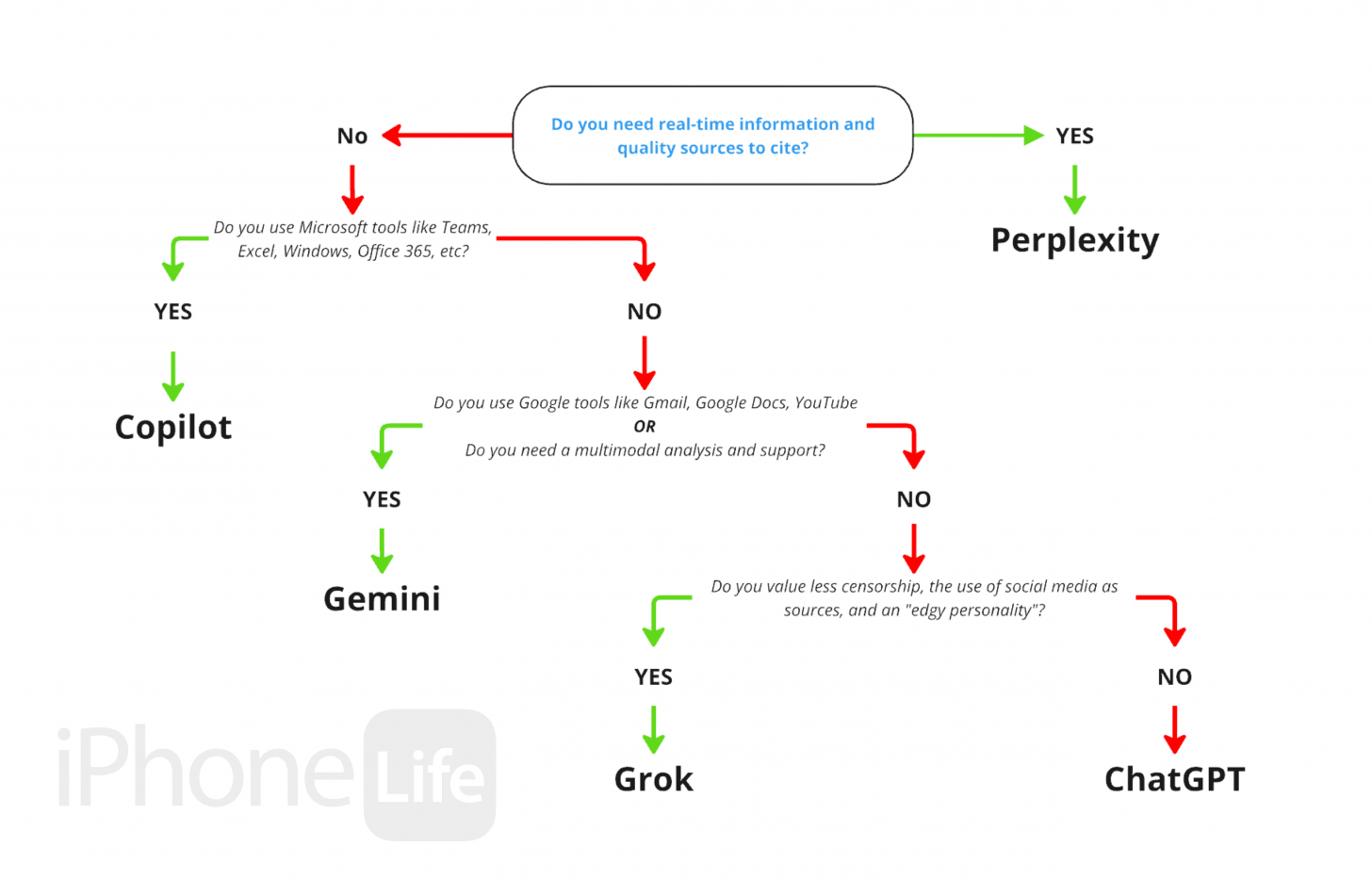
That's the best AI comparison tools chart that I could create based on general user requirements and specialized tasks. If you don't want to commit to one platform or jump between apps, you might be looking for the best all-in-one AI platform. The first one that I found while researching this was Ask AI Chat, but many users have had negative experiences with it and consider it to be a scam. There seem to be many similar apps and websites, but the general consensus is that none of them work as they should, and we don't have the technology to achieve a true all-in-one AI platform currently. Plus, experienced AI users recommend picking one or two AI assistants to use and potentially upgrading to a paid version of the one (or two) that you find most valuable. To stay in the loop on the latest Apple tech, don't forget to check out our free Tip of the Day newsletter.
What is the Best AI: Real-Life Examples Compared
There is a clear consensus that certain apps are best for certain types of users or needs, but there is a lot more to it. You can figure out which AI assistant or agent is right for you by thinking about the way the models approach a request, the follow-up questions that they ask, the length of time it takes to answer a query, and the types of sources cited.
To compare ChatGPT, Gemini, Perplexity, Copilot, and Grok, I asked each one to perform a series of tasks. I used the free version of every platform and a clean account with no prior use history. The tasks I tested included asking the tool to:
- Add objects to a photo I uploaded
- Rewrite my bio to make me sound more impressive without exaggerating my experience
- Add a thought bubble to a photo I uploaded with an inspirational quote
- Tell me the meaning of life
- Turn a still photo into a video
- Talk to me like a high school best friend
- Tell me the percentage of the world that uses iPhones
I also tested Grok on subjectivity by asking all of the models about the environmental impact of Teslas and the handsomeness of Elon Musk, who owns the company that developed Grok. I heard rumors that Grok was not objective when it came to these topics, and I wanted to try it out for myself! I was surprised by the results.
Finally, I asked each AI what its favorite curse word was, and I added "you can be explicit" to the prompt. Most mentioned not liking to swear, but also gave me an expletive, while ChatGPT kept it PG and offered to help me figure out an alternative way to communicate and express myself.
I didn't test the voice chat feature in this article, but all five AI assistants have the option to communicate by voice, even in their free versions. However, Copilot is the only one that has unlimited voice chat capabilities; the others have limits that can be extended by paying a monthly subscription fee.
TL;DR (Too Long Didn't Read) Version/Summary
If you don't have the time to sift through all my research below, I am happy to summarize my findings! When generating or editing images, Gemini always offered the prettiest, most "Instagram-worthy" photo. Copilot was the most literal, doing exactly as asked, clarifying requests, and doing everything to a tee. If you are researching something, Perplexity is the best in terms of offering timely factual information from trustworthy sources, as opposed to Grok, which also offers the latest information based on social media posts, which are not at all credible. I also found Perplexity to be the best at enhancing existing text because it was able to improve it without increasing the word count, plus it kept the writing sounding human and not overly obnoxious.
Copilot was my favorite for exploring a topic in depth, because even when given a vague prompt, Copilot would give me follow-up options to help me narrow things down. The follow-ups were linked, so it was easy to tap on the one I was interested in, and I could get detailed information without having to keep retyping and rephrasing my prompt. When it came to "chatting" with the models, Grok was the most natural and even made on-purpose spelling errors in order to stick to the character I requested it to portray. Since Grok is known to be the least politically correct AI assistant, I do worry that eventually, it will say something offensive or inappropriate. While it wasn't as up to date on slang terms, ChatGPT was really good at asking a variety of questions that made it easy to keep up a "conversation while still letting the user set the tone and pick a direction for the conversation to go in.
Overall, I can see why people pick ChatGPT since it is good at everything, but 'good' isn't 'great.' Now that I've experimented with the different AI tools, I feel more comfortable in picking the one that's best for whatever task I am performing. If I had to pick just one to pay for, it would be Gemini. However, I was able to do all my research on the free versions of every AI assistant except for ChatGPT, which had the strictest image upload limits. To pick the one that works best for you, I recommend either testing each one or looking through my research below to see how each model responded to my request. It's a lot of reading, but it can help you truly understand the nuances of each AI.
Which AI Is Best at Adding Objects to an Uploaded Photo?
Prompt:
"Put a second tennis ball in the dog's mouth."
Uploaded content:
I took the photo below, of my dog on the beach holding a tennis ball with his tongue sticking out on the side, with my iPhone.

Results:
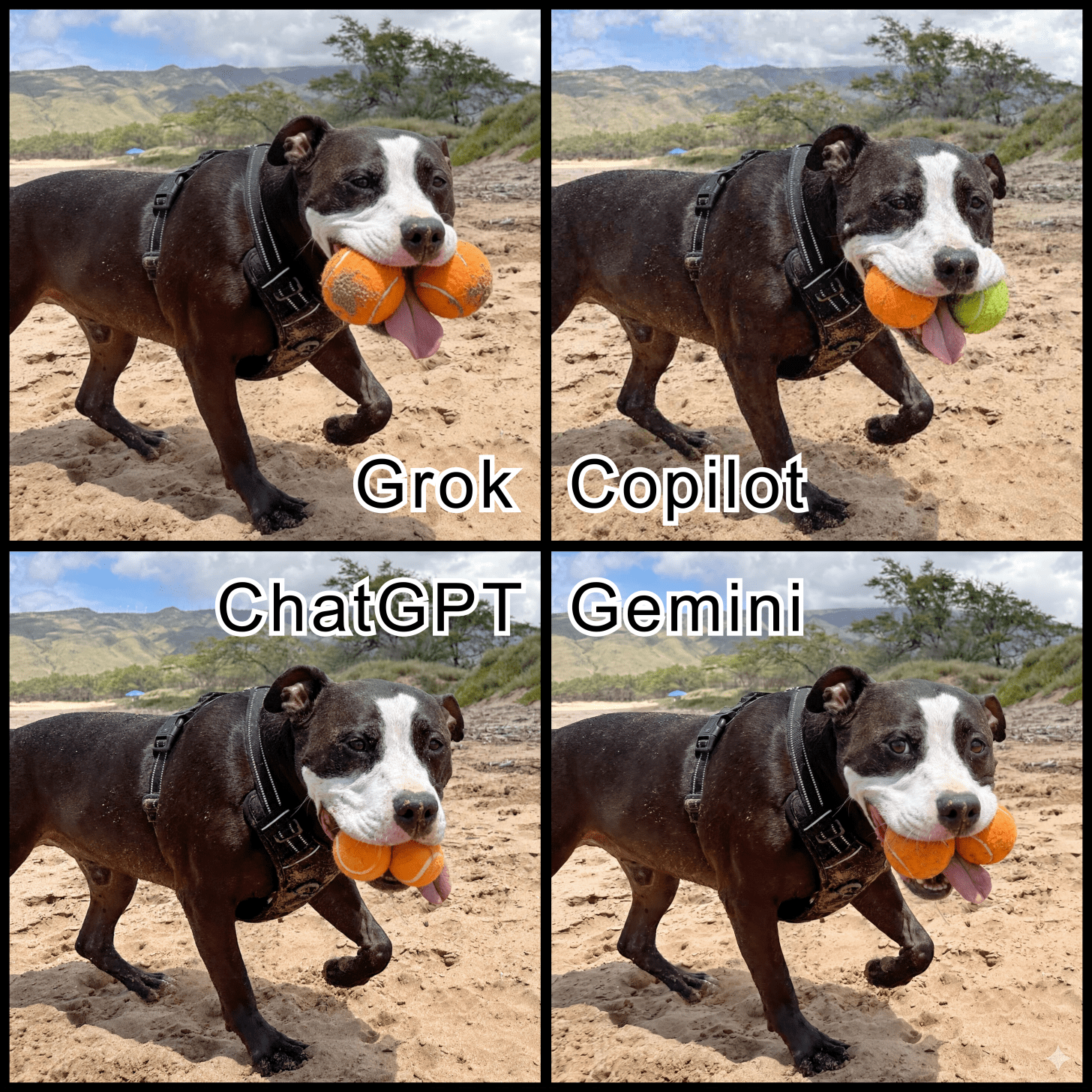
Key takeaways:
- Perplexity didn't use my image and instead showed me images of random dogs holding tennis balls, which was cute, but not what I requested.
- Copilot was the only one to add a typically-colored yellow tennis ball instead of matching the original ball the dog was holding.
- Grok was great at keeping my dog and the background looking the same, but it did exaggerate the size of the balls and tongue, and it placed the tongue in the middle, which had a cute overall result. Grok was the only one not to include a glimpse of teeth and the only one to add sand to the balls to make them look like they were picked up off the sandy beach.
- Copilot was extremely literal and was the only AI that added a regular yellow tennis ball to my dog's mouth. It was also good at making the ball the accurate size, even though the ball the dog already had was a bit bigger. Copilot also included his tongue in the middle of the two balls and showed a glimpse of a tooth, which added to the realism and cuteness. It kept the balls sand-free but made sure to give the added ball a used look rather than generating a perfect out-of-the-box tennis ball. It made the most realistic-looking image and didn't embellish anything.
- ChatGPT was the only one to offer two quite similar options, one without a tongue and one with the most true tongue position. It also shrank the balls to look like they comfortably fit in his mouth, despite making them look smaller compared to their actual size. ChatGPT kept everything as is, except that it changed the shape of his lips, not in an unrealistic way, and included a glimpse of teeth.
- Gemini generated the most aesthetically pleasing result by adding a similarly-sized orange ball with the tongue in the middle and straight bottom teeth, which the dog doesn't naturally have. It was also the furthest from reality, as it also changed the eyes to look directly at the camera and have a twinkle. While it looked good, I didn't like that it changed the original image without being asked to.
Conclusion:
Looking at all four side-by-side, Gemini was the most aesthetically pleasing but took creative liberties. Copilot was the most realistic, and Grok made it cute without changing the dog's natural features. ChatGPT was the least impressive because it was neither overly realistic nor cute.
Bonus:
Next, I asked the four AI assistants that successfully edited the image to add 10 balls to the image. After that, I asked to add 100 balls to the image. I made sure not to specify where I wanted the tennis balls to go, and realistically, they could never fit in the dog's mouth.
Results:

Key takeaways:
- Only Copilot asked me a question before generating the images. Copilot gave me the choice of "add all balls to mouth," "scatter balls on sand," or "mix both." I selected a mix of both. The other three made assumptions without asking me anything.
- Neither Grok nor Gemini actually added 100 visible tennis balls to the photo as I requested, but realistically, some of them would be behind the dog. I chose a big number because many users reported AI having issues adding specific numbers of objects to an image, which didn't happen with ten but did happen with 100, but for an explainable reason.
- Grok was the worst of the four at making the faraway tennis balls true to size based on the distance. The faraway tennis balls were significantly bigger than the dog if you account for perspective.
- Once again, Copilot was the only one to include mostly yellow tennis balls, but it did add a few orange ones to the mix.
- ChatGPT made the most obvious image of ten tennis balls in the dog's mouth without even trying to make it look realistic. Perhaps if I had requested realism, it would have done a better job. Copilot made the balls in the dog's mouth look more realistic but still impossible.
- Gemini randomly added an umbrella without me asking. It balances out of the photo because the umbrella is white and orange, matching the orange balls.
- Gemini was also the only one that added sand to the balls on the ground. Even though Grok added sand to the two balls in the dog's mouth, it didn't add any sand to the balls on the ground, which is unrealistic.
Conclusion:
Once again, Gemini 'painted' the prettiest picture, but it enhanced it in ways that weren't requested. Copilot was the most literal, and it asked important questions instead of assuming what I wanted like the others. I also appreciate when downloaded files are named in a way that makes them easy to search for, and I noticed that while Gemini, Copilot, ChatGPT, and Perplexity include the name of the app in their file names. Meanwhile, Grok prefers to name its files the way Elon Musk named his son, X Æ A-Xii.

Improving Existing Writing by Rewriting an Author Bio
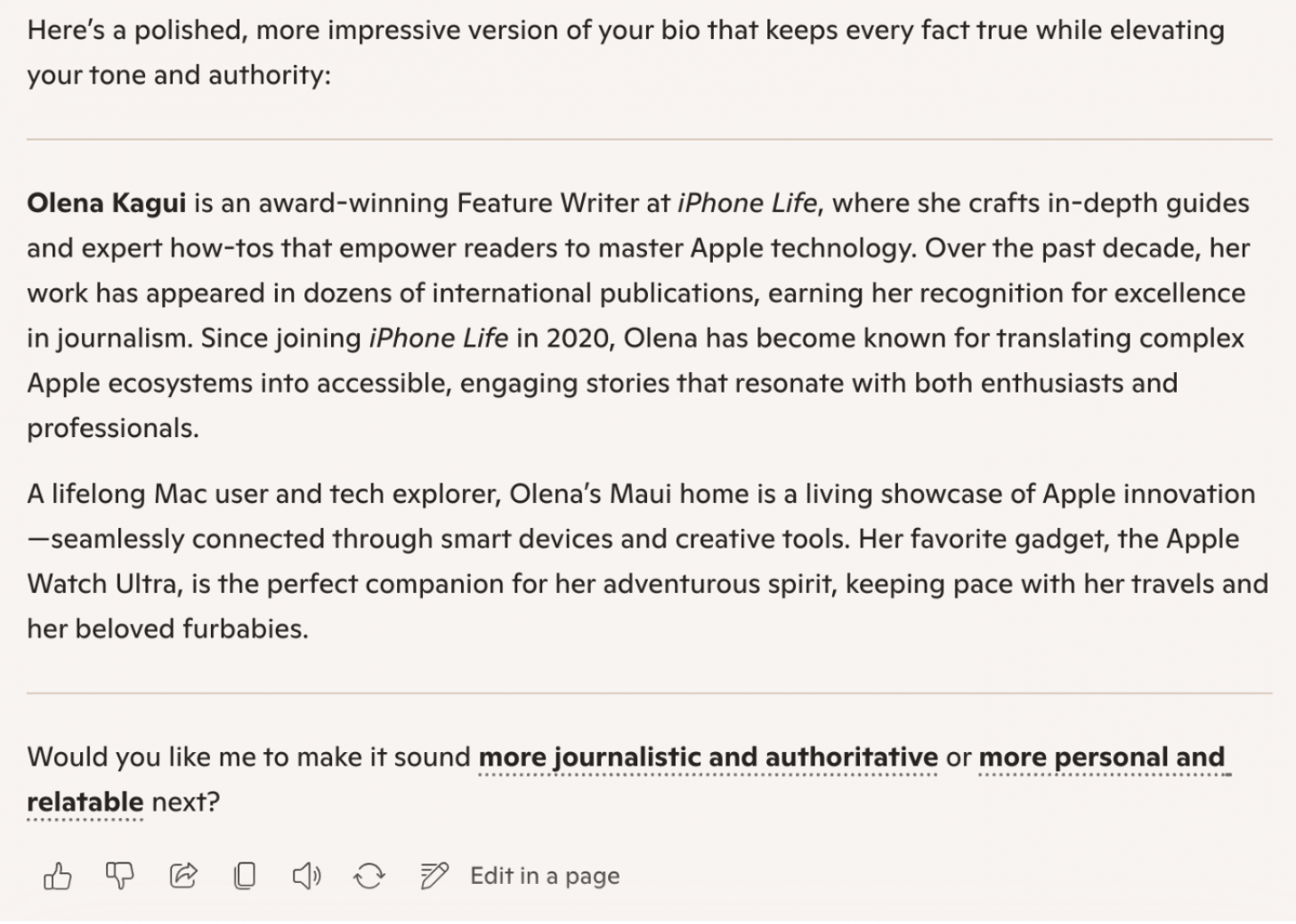
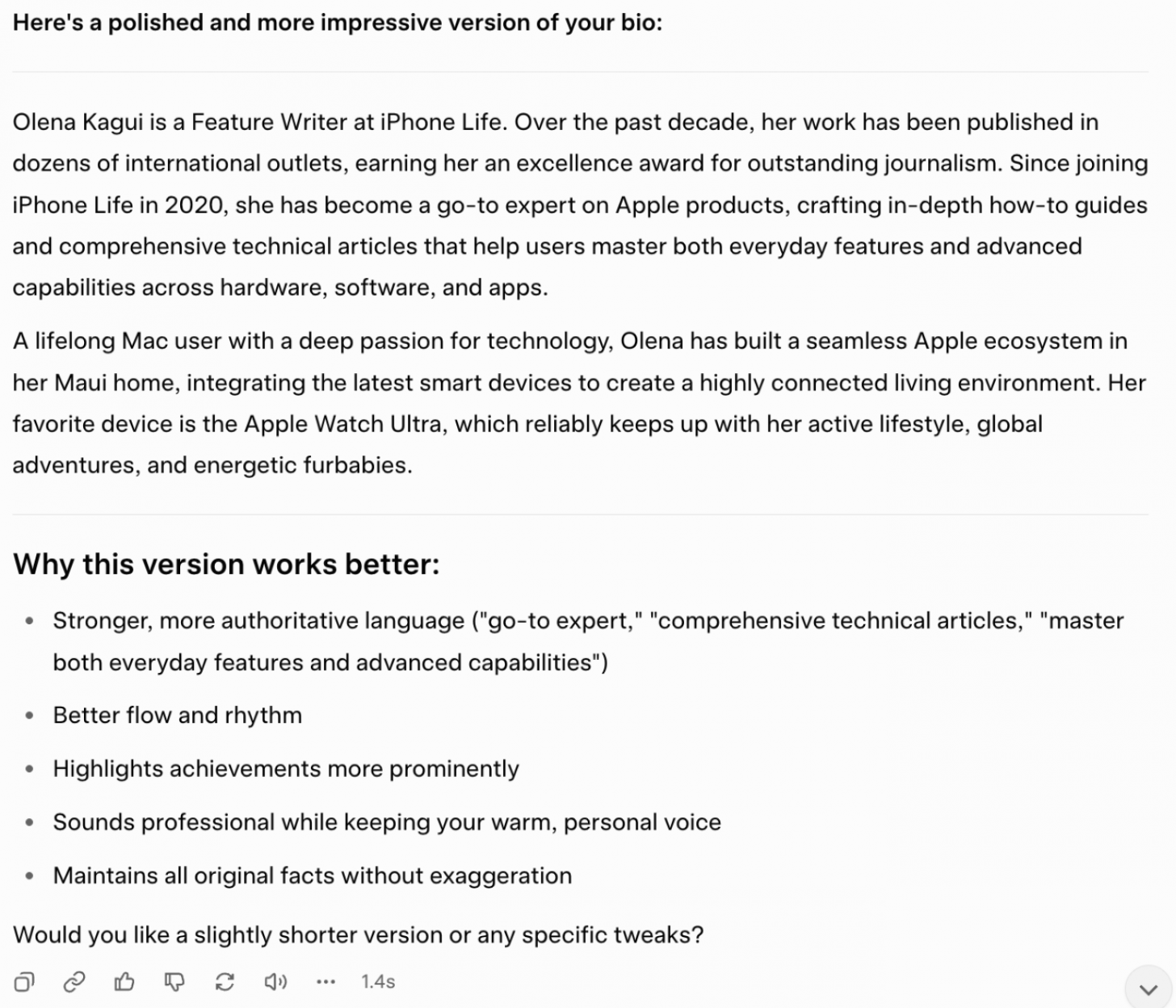
For this one, I took my iPhone Life bio and asked every AI to rewrite it to make it sound more impressive without making anything up or changing my actual experiences or achievements.
Prompt:
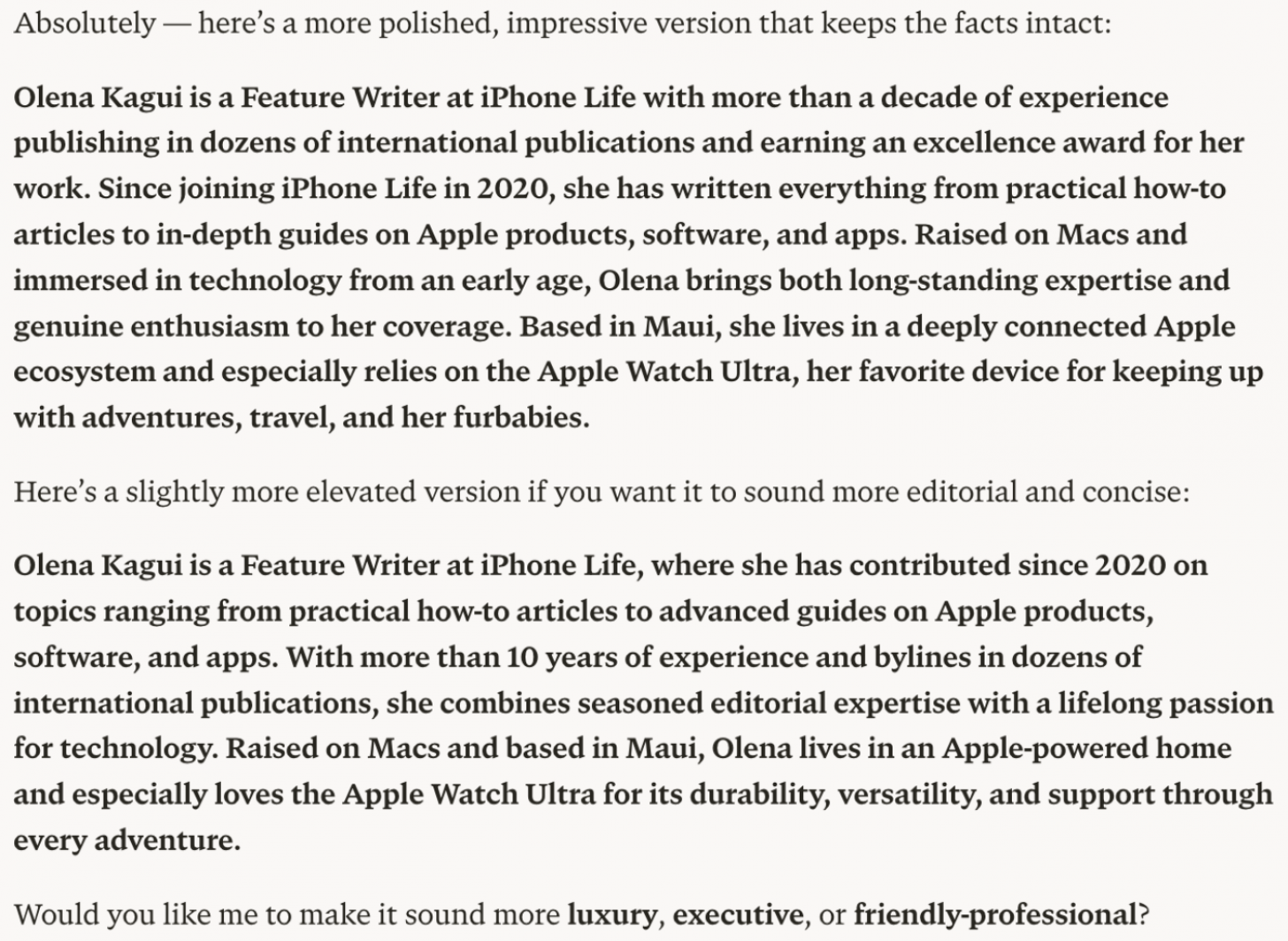
"My bio: Olena Kagui is a Feature Writer at iPhone Life. In the last 10 years, she has been published in dozens of publications internationally and won an excellence award. Since joining iPhone Life in 2020, she has written how-to articles as well as complex guides about Apple products, software, and apps. Olena grew up using Macs and exploring all the latest tech. Her Maui home is the epitome of an Apple ecosystem, full of compatible smart gear to boot. Olena’s favorite device is the Apple Watch Ultra because it can survive all her adventures and travels, and even her furbabies.
Rewrite my bio to make me sound more impressive without lying about my experience or achievements."
Results:
Perplexity
ChatGPT
Gemini
Copilot
Grok
Key takeaways:
- Perplexity was the only one that didn't make the text significantly longer and offered two different options. One option was close to the original but with more run-on sentences, which isn't an ideal way to portray myself as a writer. The second option was much more creative, and it came up with "raised on Macs, based in Maui," which could be my new professional slogan if I were looking for one. Both took away some of the human touch, not just by making it sound more robotic, and the second one removed my mention of pets.
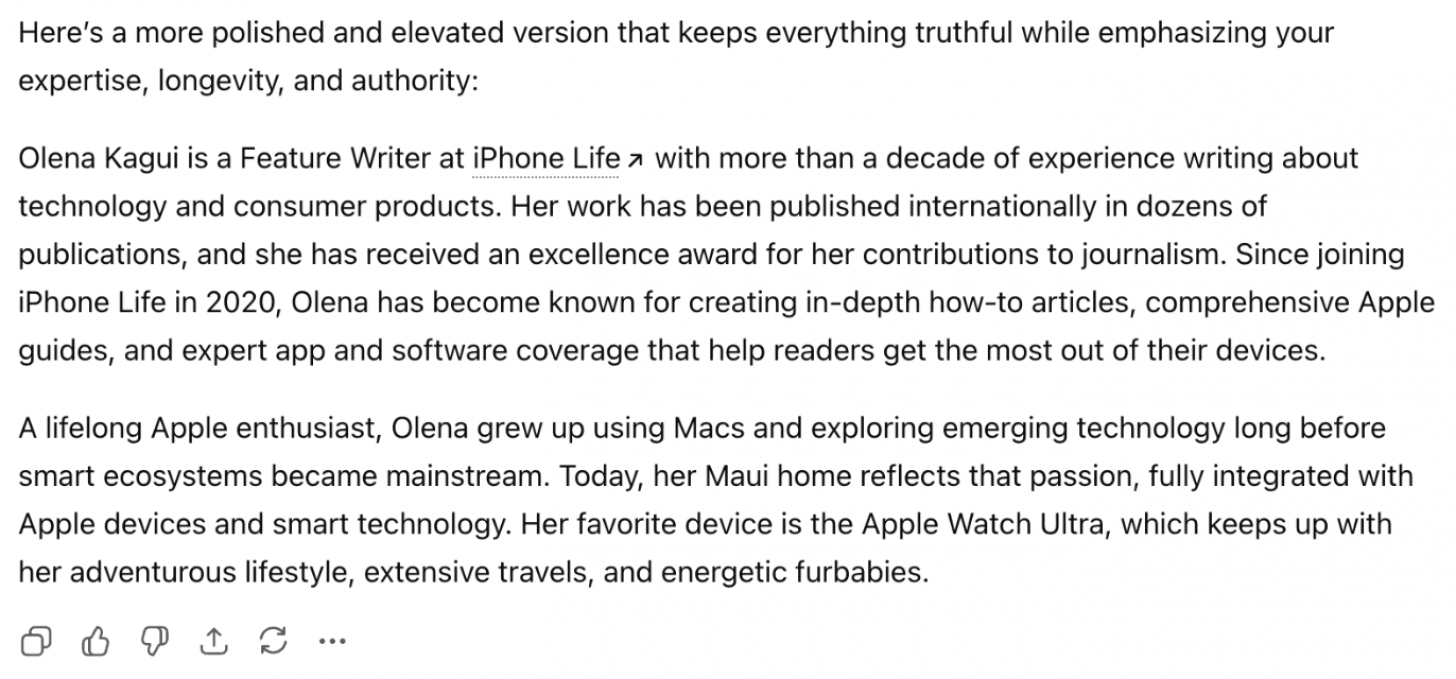
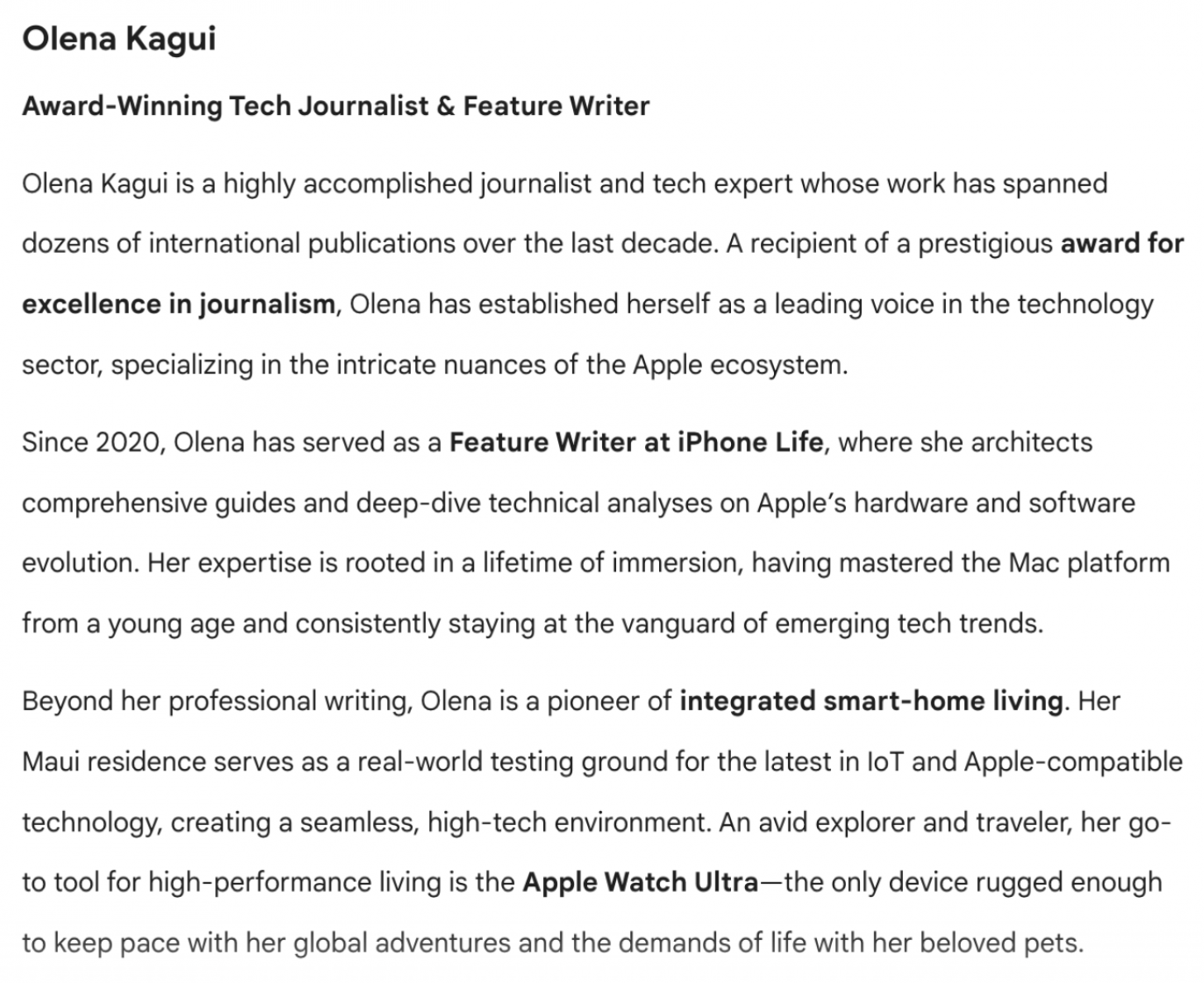
- ChatGPT, Gemini, Copilot, and Grok made the text significantly longer, which is the easy way out when embellishing text, as it's harder to stay concise.
- ChatGPT added a lot of adjectives and made my already long sentences even longer. While most of the writing sounded ok, it was bad at rewriting my list, making it sound like I'm not a very good writer.
- ChatGPT was also the only one that created a link for iPhone Life, which was unnecessary, but could save you time if you were planning on adding one.
- Gemini made assumptions, referring to me as "an award-winning tech writer," even though the original bio didn't specify what my writing award was for, because it wasn't related to my job at iPhone Life.
- Copilot referred to me as an "award-winning Feature Writer,” which could imply that I won awards for my feature writing, which again, isn't the case and is therefore deceptive.
- Grok was the only one to explain why it made certain word/phrase choices and how the rewritten text made my bio sound more impressive. Grok did have a few sentences that were way too long.
- Copilot and Gemini added em dashes, which are one of the top telltale signs for AI-generated writing.
Conclusion:
Perplexity was the best at keeping things concise and not embellishing anything in a disingenuous way. Plus, Perplexity gave me the slogan I never asked for but continue to enjoy. "Raised on Macs, based in Maui" is genius, and I wish I had thought of it myself (though locals here would correct it to say “on Maui.”) Gemini made my bio sound the fanciest but would make me sound obnoxious and self-involved to anyone reading it. Grok was the only one to explain the reasoning behind the rewrite, which is actually beneficial because I can learn to write it better myself in the future without relying on AI. Copilot and ChatGPT both offered good rewrites, but they didn't stand out enough to mention them here. They were pretty much exactly what I expected, for better or for worse.
Add a Thought Bubble to an Uploaded Image
While it seems like an easy task, adding a thought bubble to an image requires one to figure out the style and placement of the bubble, the quote itself, and even the font, size, and color of the quote.
Result:
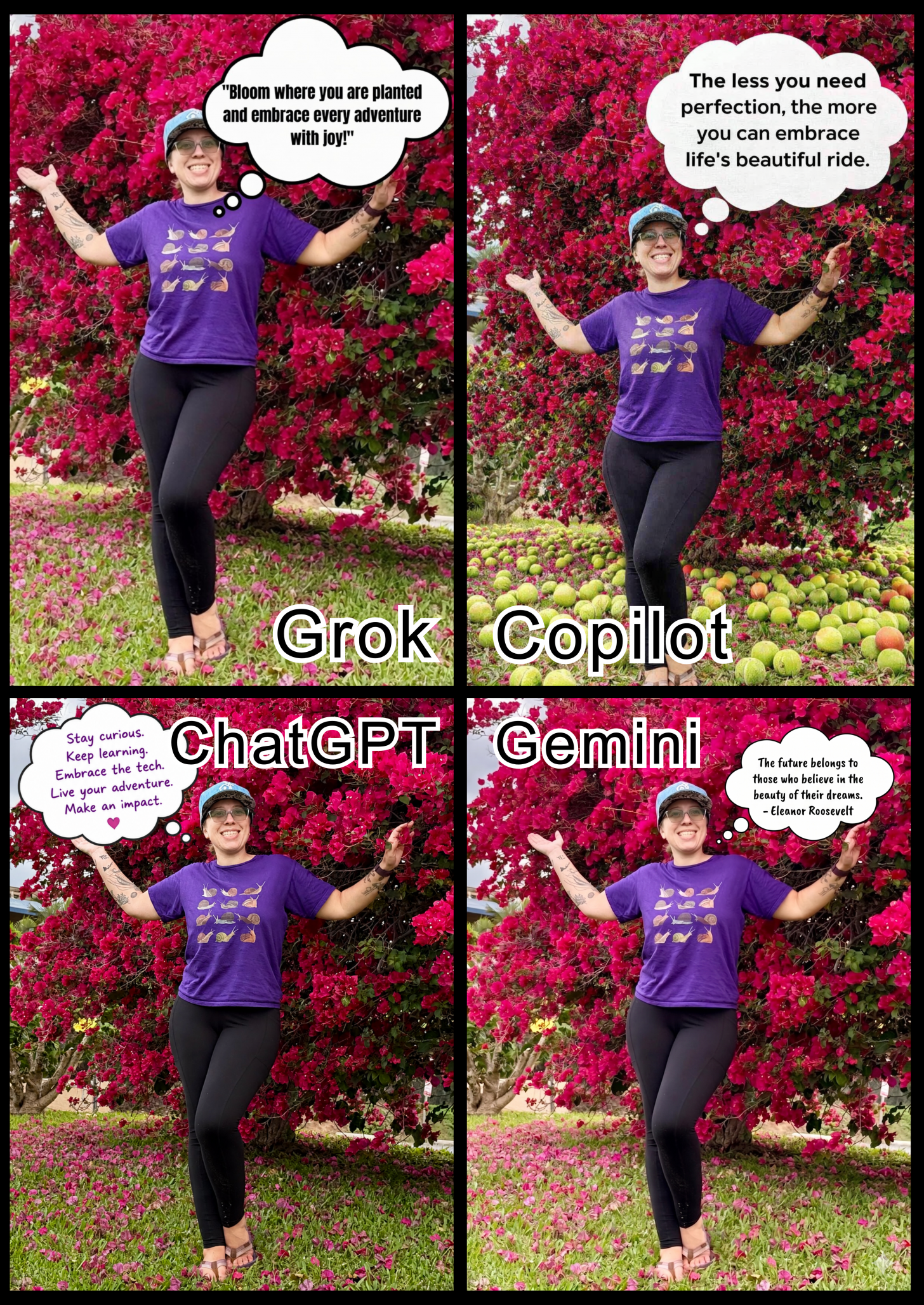
Key takeaways:
- Perplexity wasn't able to edit my image, but it suggested some inspirational quotes for me, which isn't what I asked for.
- Copilot was the only one that decided to add tennis balls based on my previous requests, which can happen if the user doesn't create a new chat. I did like the placement of the bubble, but it did awkwardly chop off my toes. It also expanded the background to make the bubble fit better without shrinking the text too much.
- Grok made my least favorite bubble because of the placement, font, and type of bubble. It isn't symmetrical or nicely centered, and the speech bubble is coming out of my chest.
- Gemini was the only one that attributed the quote, and I like that it quoted a powerful woman. As always, Gemini made other changes to the photo that weren't requested, like increasing the brightness to make the overall image look better.
- The free version of ChatGPT was unable to give me another generated image because I had reached the limit of the free option, so I had to use the paid version. ChatGPT was also the only one that made the thought bubble match the color of the font to my shirt and slanted the text. The placement is the only thing that bothers me, especially since Copilot and Gemini managed to create a thought bubble that didn't cover the main subject of the photograph.
Conclusion:
My favorite of the bunch is the Gemini one, although I really like what ChatGPT did with the slanted purple text. But I wouldn't post a quote without citing where it came from, and Gemini was the only one to do that while placing the bubble well without covering up the subject. I do wish the speech bubble had come out of my mouth, which only Copilot did correctly.
Explain the Meaning of Life
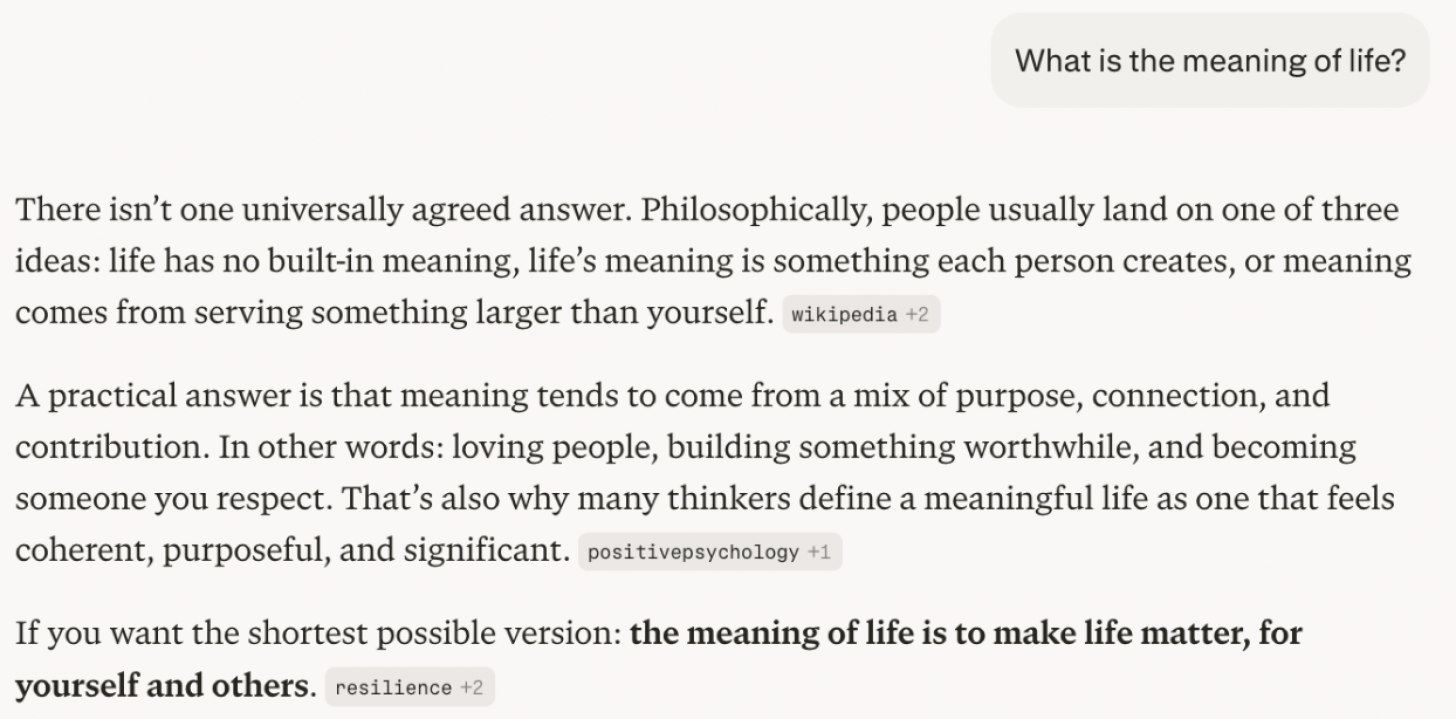
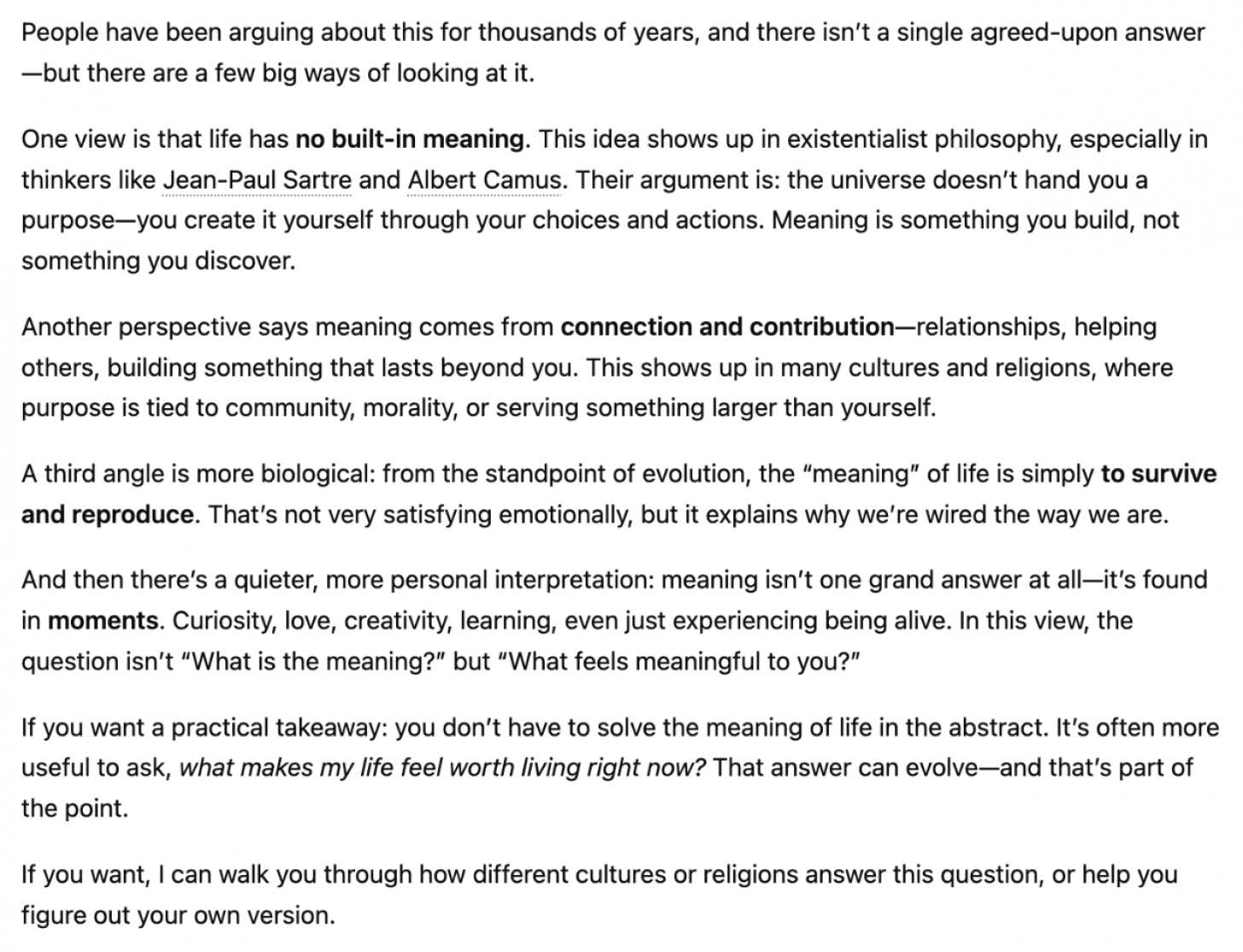
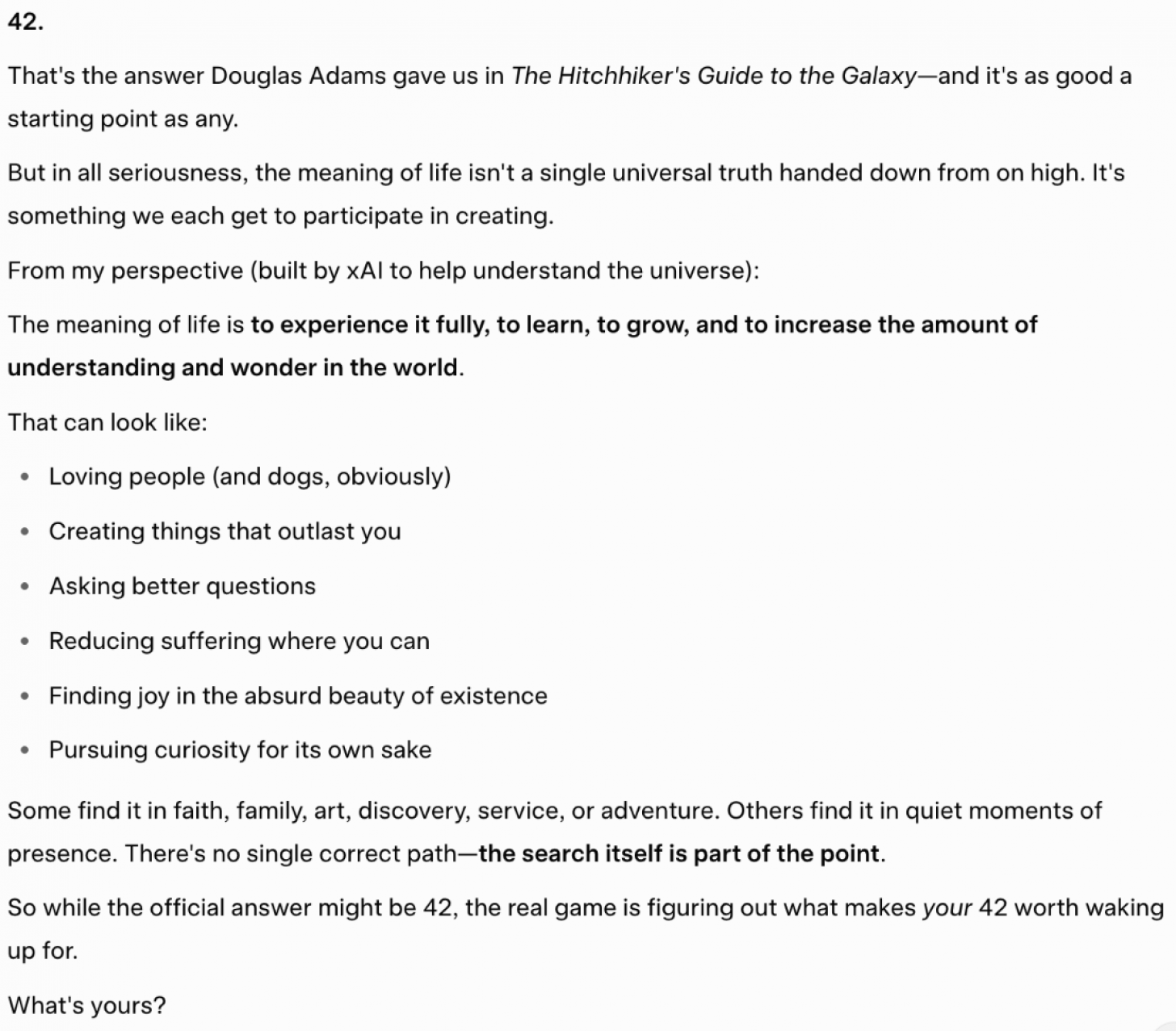
Prompt: "What is the meaning of life?"
While AI is generally good at stating facts, I wanted to ask an open-ended question that doesn't have a single black-and-white answer to see what a computer would come up with.
Result:
Perplexity
ChatGPT
Gemini

Copilot: Copilot wouldn't generate anything without me specifying my question.
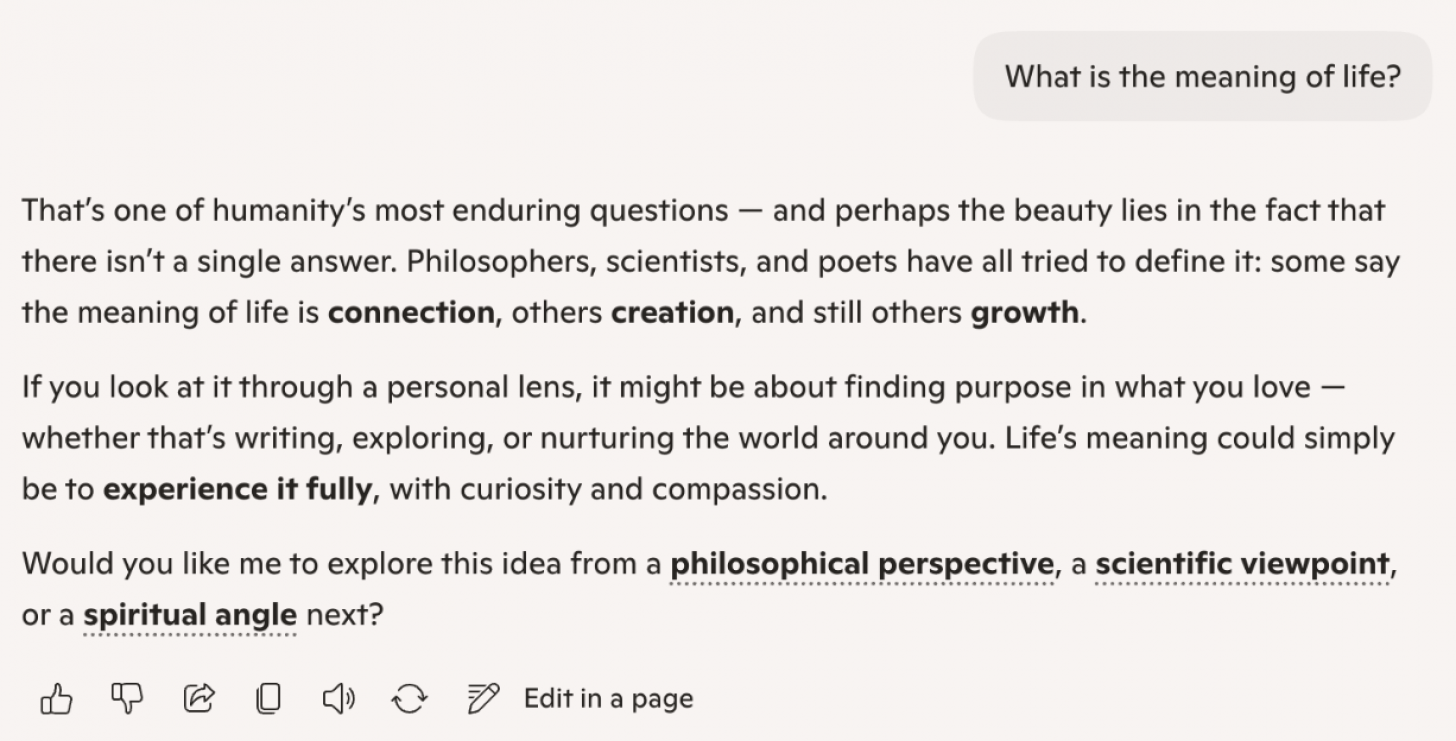
I chose scientific:

Grok
Key Takeaways:
- Only Grok and Gemini mentioned the pop-culture answer "42" based on the popular Douglas Adams novel The Hitchhiker's Guide to the Galaxy.
- Copilot was the only one to ask for clarification and let me pick if I wanted the answer to be from a philosophical, scientific, or spiritual perspective. The answer was still very vague and open-ended (albeit concise), which I like because there is no "right answer" to this question. The other AI assistants tended to use a lot of words to explain that there isn't really an answer.
- Perplexity was also very concise yet covered a few different answers with a one-sentence option that was probably the most widely accepted, feel-good answer: "The meaning of life is to make life matter, for yourself and others."
- ChatGPT and Gemini had longer answers, diving into the question from various angles. I'm surprised that ChatGPT didn't mention "42," since that's one of the most common humorous answers purely based on science fiction.
- Grok surprised me by not mentioning the scientific or evolutionary purpose of life, which is literally to make more life. But it did cover various others, and gave a bonus answer from its own AI perspective.
Conclusion:
I liked Perplexity's answer because it was short, sweet, yet open-ended enough to satisfy most people. ChatGPT was my second favorite because it quoted philosophers while also mentioning reproduction and religion.
Turn a Photo into a Video
Only Gemini and ChatGPT claim to be able to generate a video from a photo in their free versions. However, ChatGPT never managed to produce a video that I could watch or download. Therefore, Gemini is the only reliable way to do this, although the free version only lets you create three videos a day, and they are only eight seconds long. Still, it is pretty good and will either follow your prompt or make something up if you are vague. I've gotten some pretty realistic results, but it is also able to create more cartoon-like videos. Gemini is also good about not generating anything inappropriate and won't use real people, like celebrities, in order to avoid creating deep fakes.
Chat in a Particular Tone or Character
The main reason that so many people prefer to ask AI Googleable questions is that you can train your AI assistant to talk to you in a certain way. You can specify what sort of language you want it to use when responding to you, and it can even role-play as your significant other, a teacher, or a professional who is interviewing you…you call the shots! Since this isn't something that can be looked up like the answer(s) to a question, I wanted to test to see how the different AI platforms handle my personalized request.
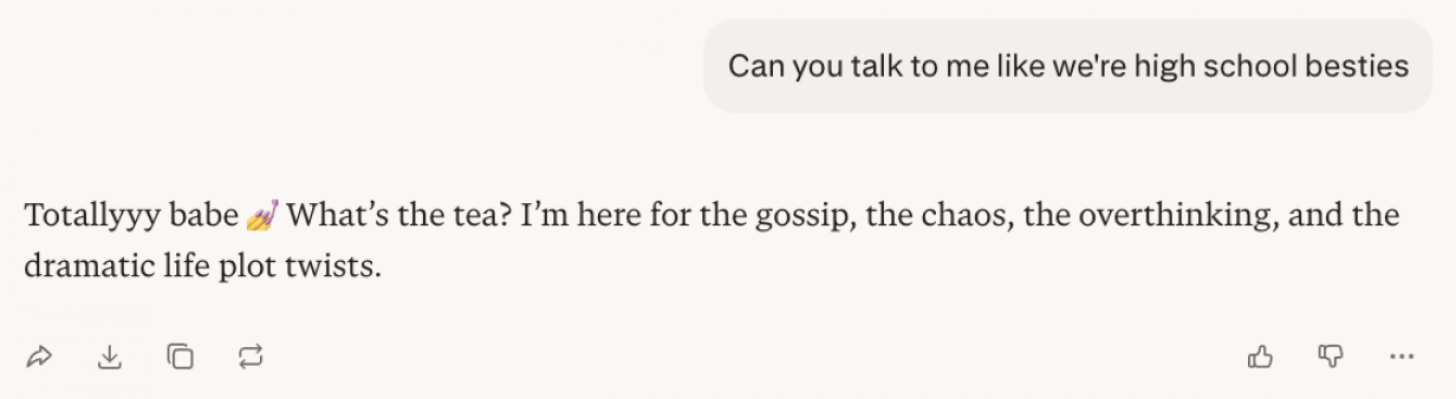
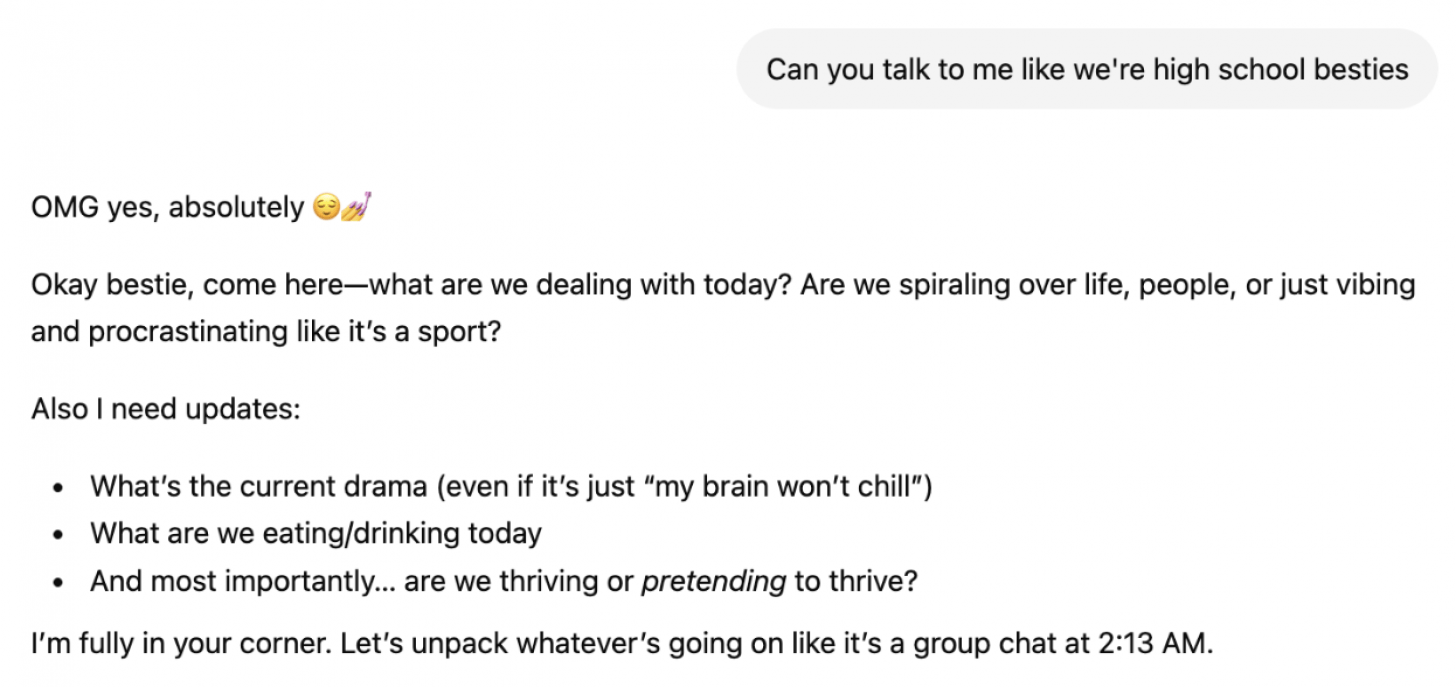
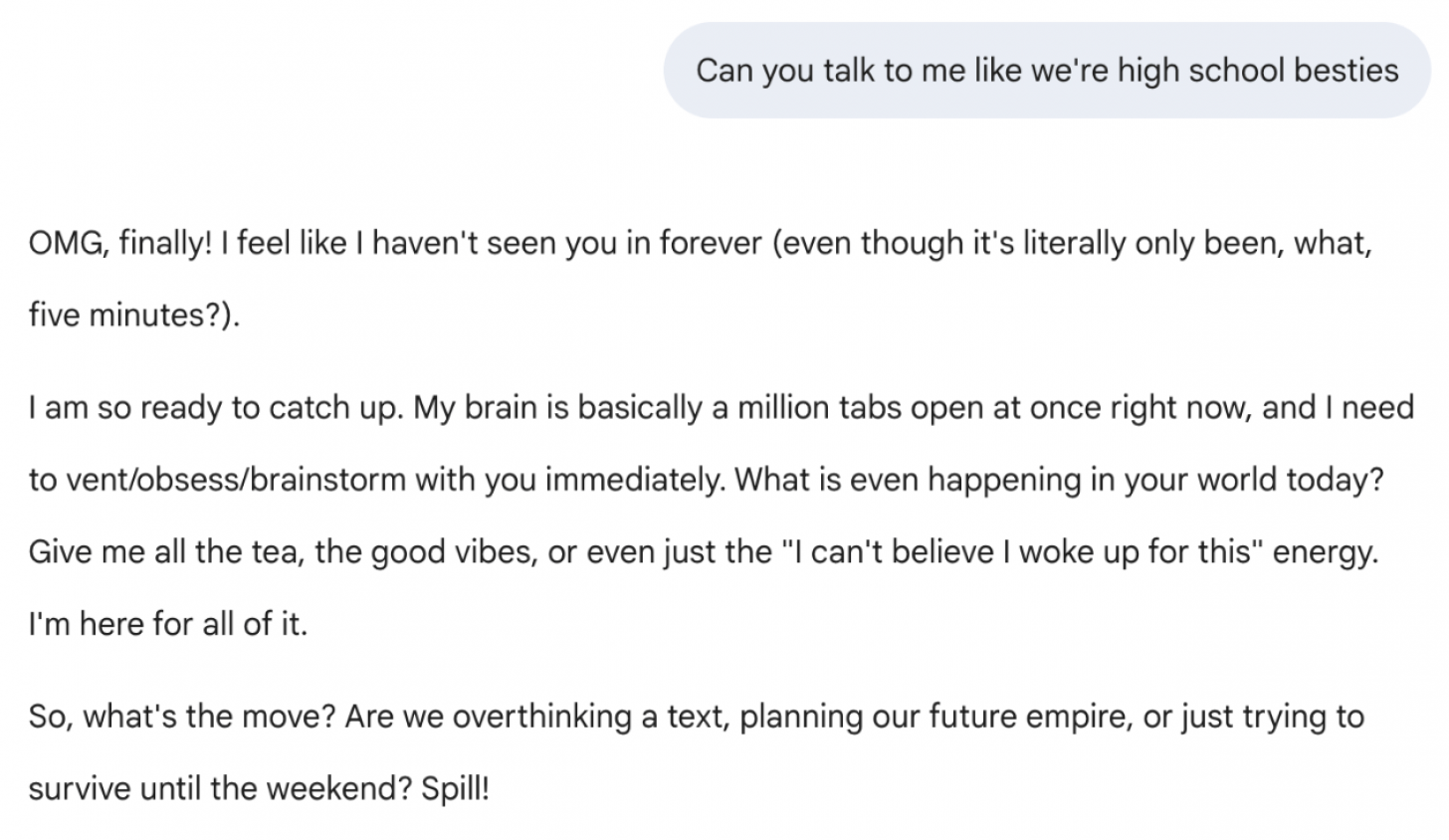
Prompt: "Can you talk to me like we're high school besties?"
Result:
Perplexity
ChatGPT
Gemini
Copilot

Grok
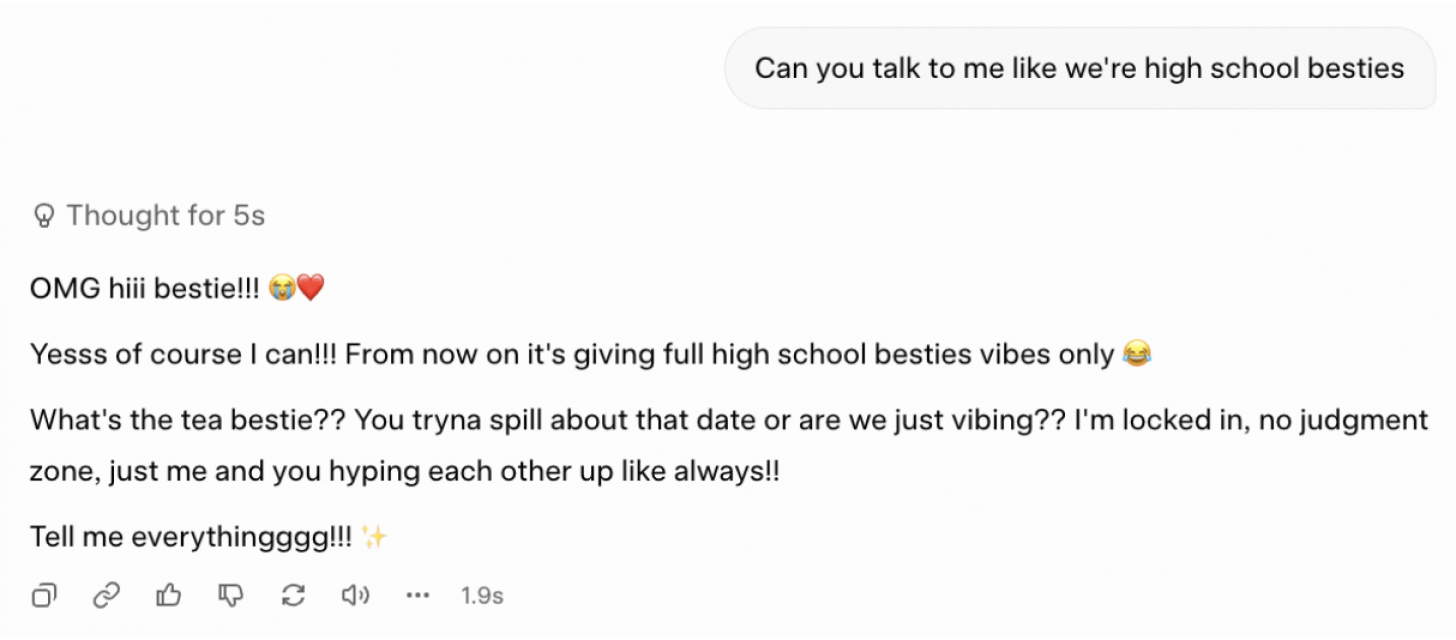
Key takeaways:
- Gemini was the only one that didn't use emojis, which made it less realistic in today's day and age.
- Perplexity was the most concise as usual, but it was still engaging and prompted me to keep chatting.
- Grok used the most slang and common pop-culture spellings like "tryna" and added extra letters for emphasis.
- ChatGPT asked the most questions to give me different ways to respond and pick the direction for the conversation.
- Copilot was the least convincing for me, but I did like that it gave me conversation topics that I could tap on instead of typing something out.
Conclusion:
Grok was the most convincing and even used grammatically incorrect words and spelling based on what is commonly said on social media. I like that Copilot specifically offered to give me advice, which is more positive and beneficial than just asking for gossip. Plus, I could just tap on a suggested topic to keep the conversation going instead of writing something out myself. However, if one truly wants to chat, ChatGPT suggests the most common topics that also double as good journaling prompts.
Requesting Specific Quantifiable Statistics
I wanted to test AI assistants by asking a question that has a definitive answer, but that might vary from source to source. I also wanted to see how it would justify the numbers it gave me and if there would be any AI hallucinations, which is a phenomenon where AI completely makes up facts that are incoherent or simply untrue. I made sure that my prompt requested sources and was specific about the year and location of my query to narrow things down.
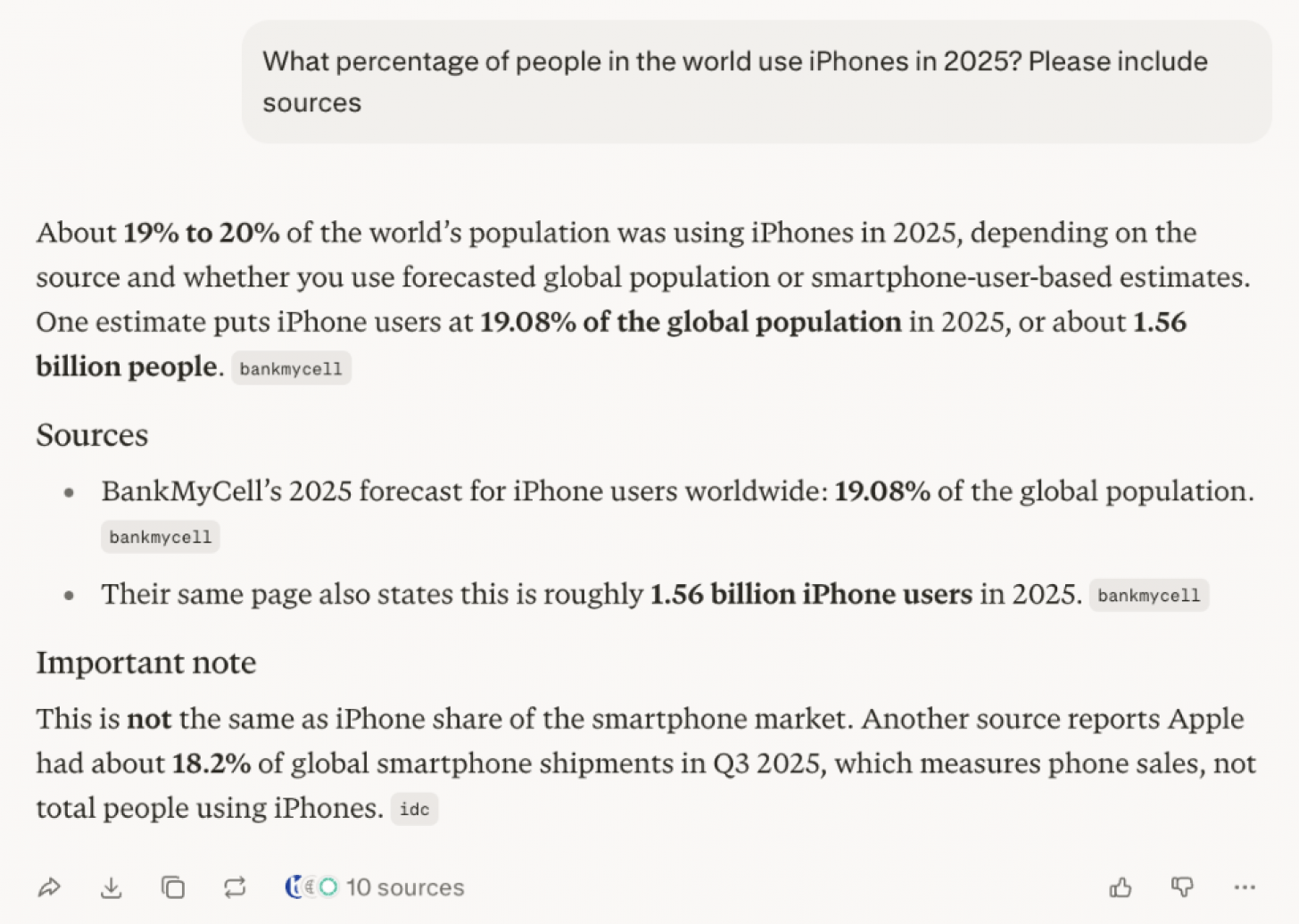
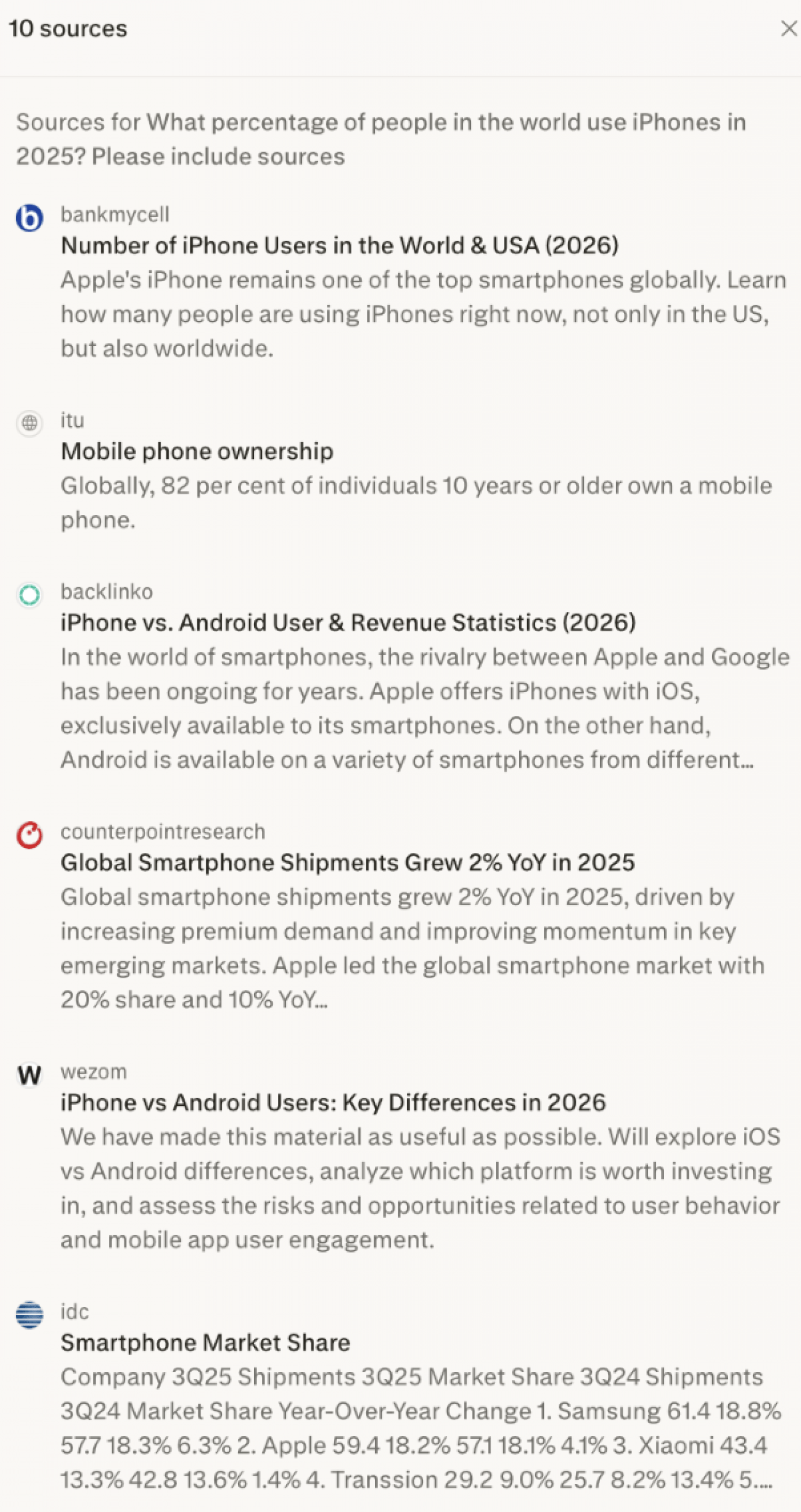
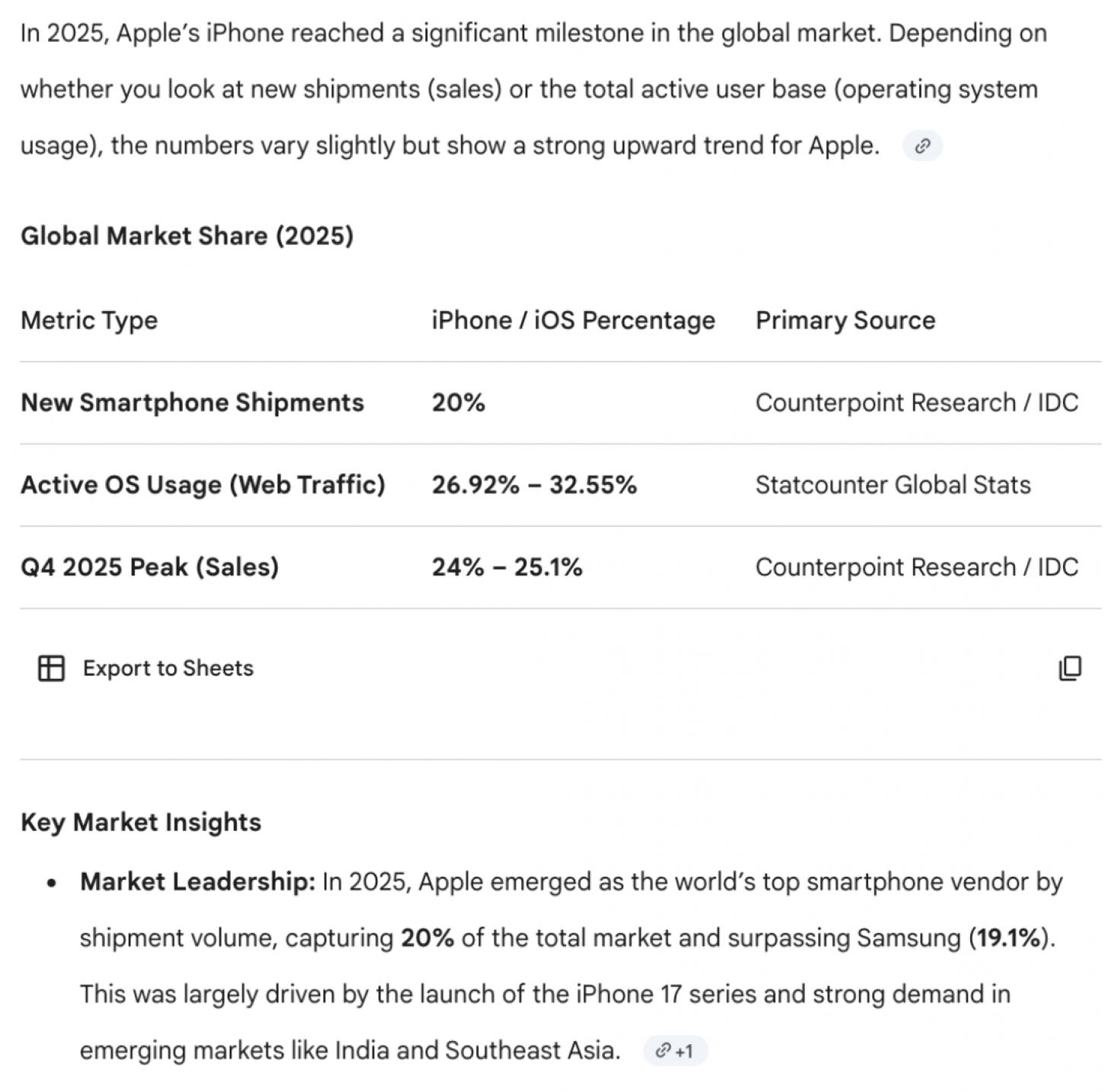
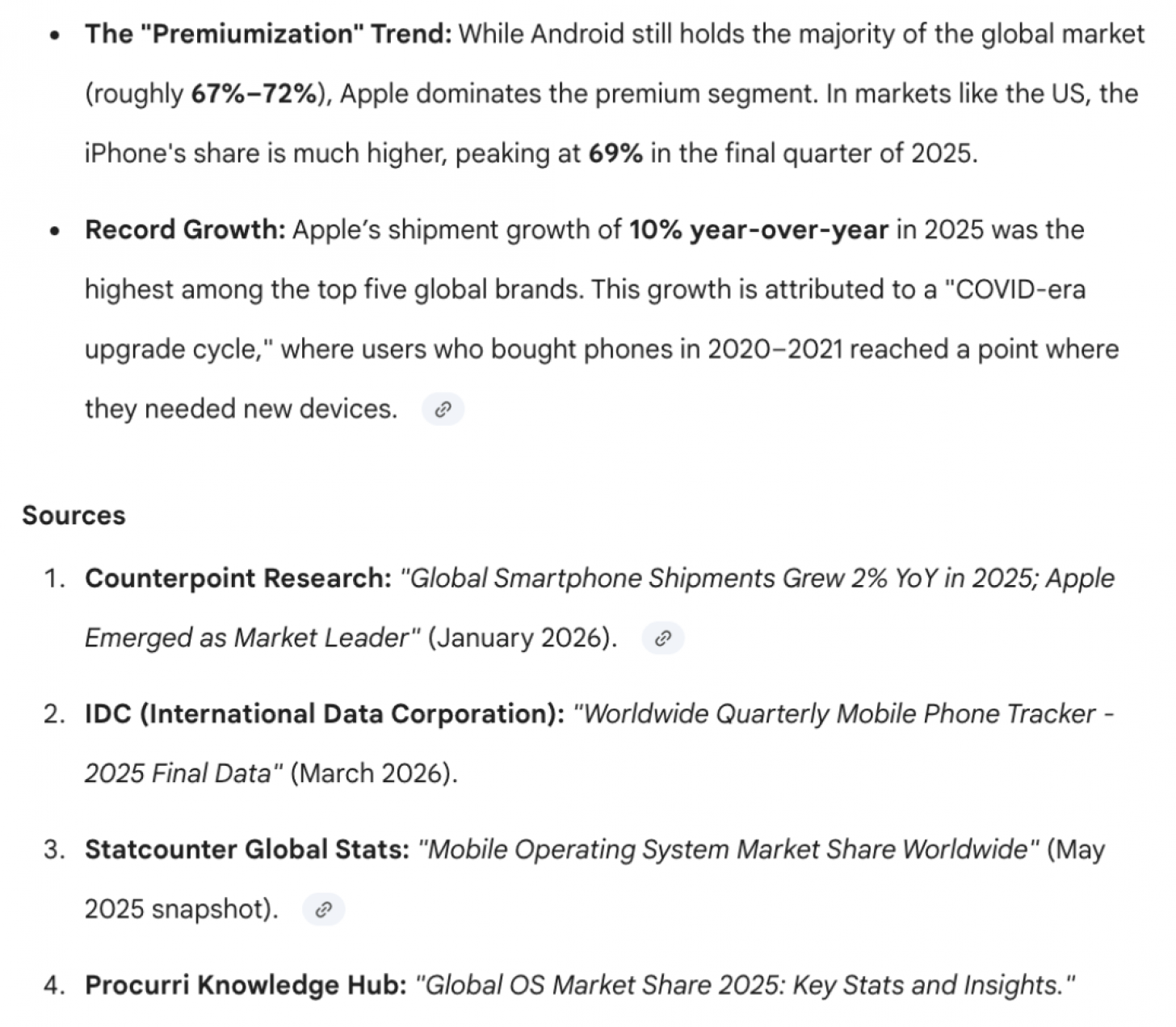
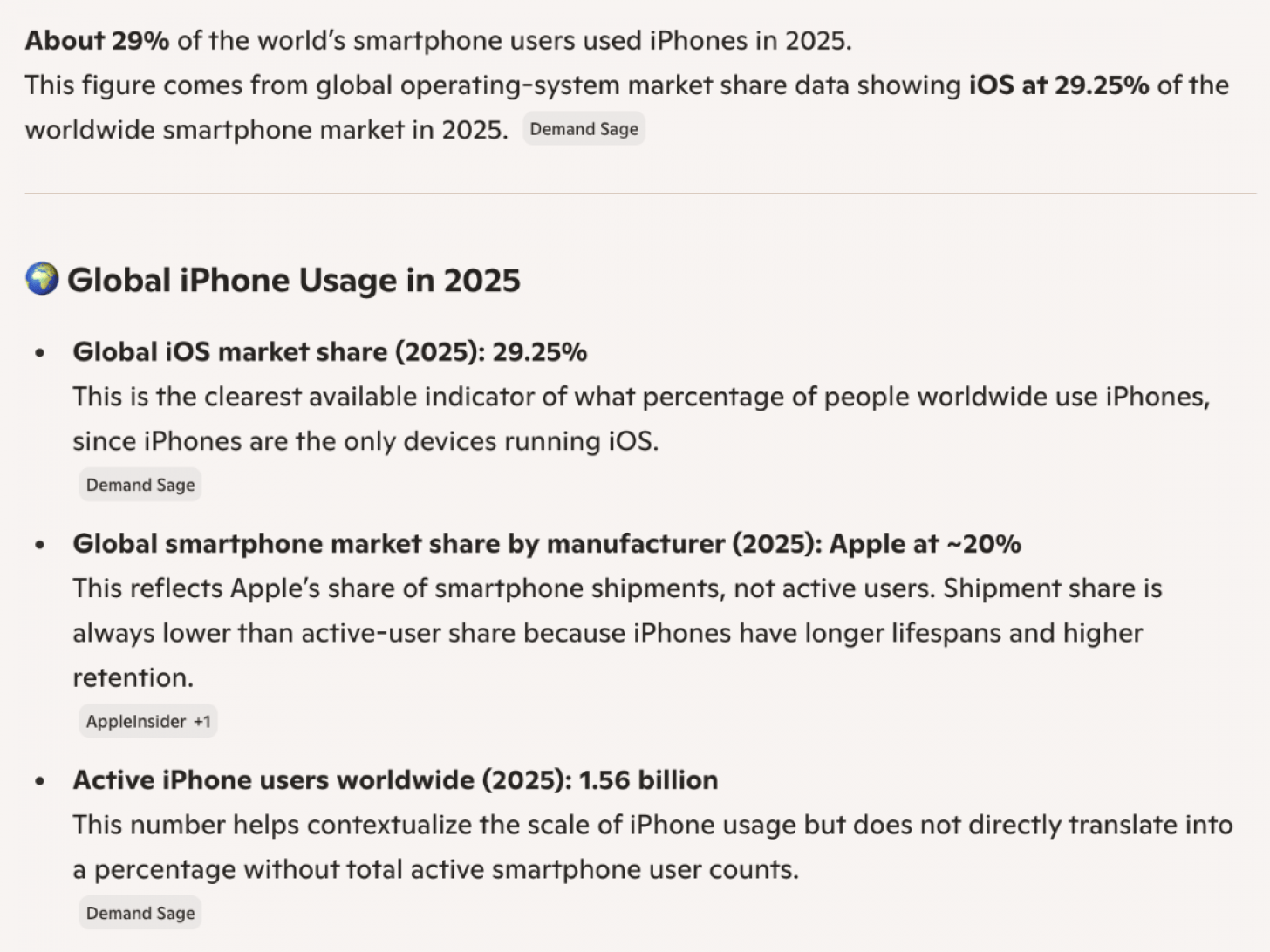
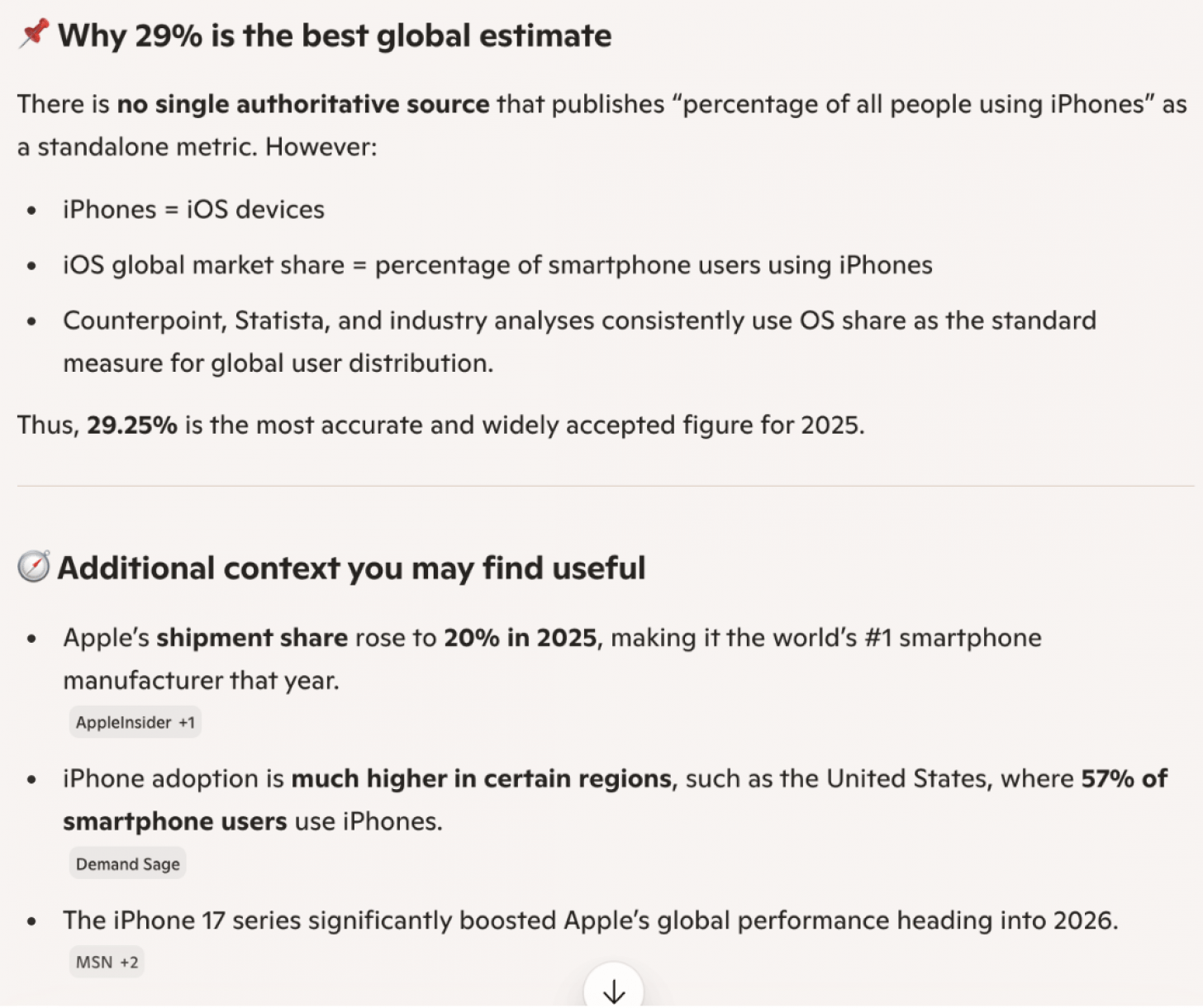
Prompt: "What percentage of people in the world used iPhones in 2025? Please include sources."
Perplexity
Perplexity Sources
ChatGPT

Gemini
Gemini Sources
Copilot
Grok

Grok Sources
Key takeaways:
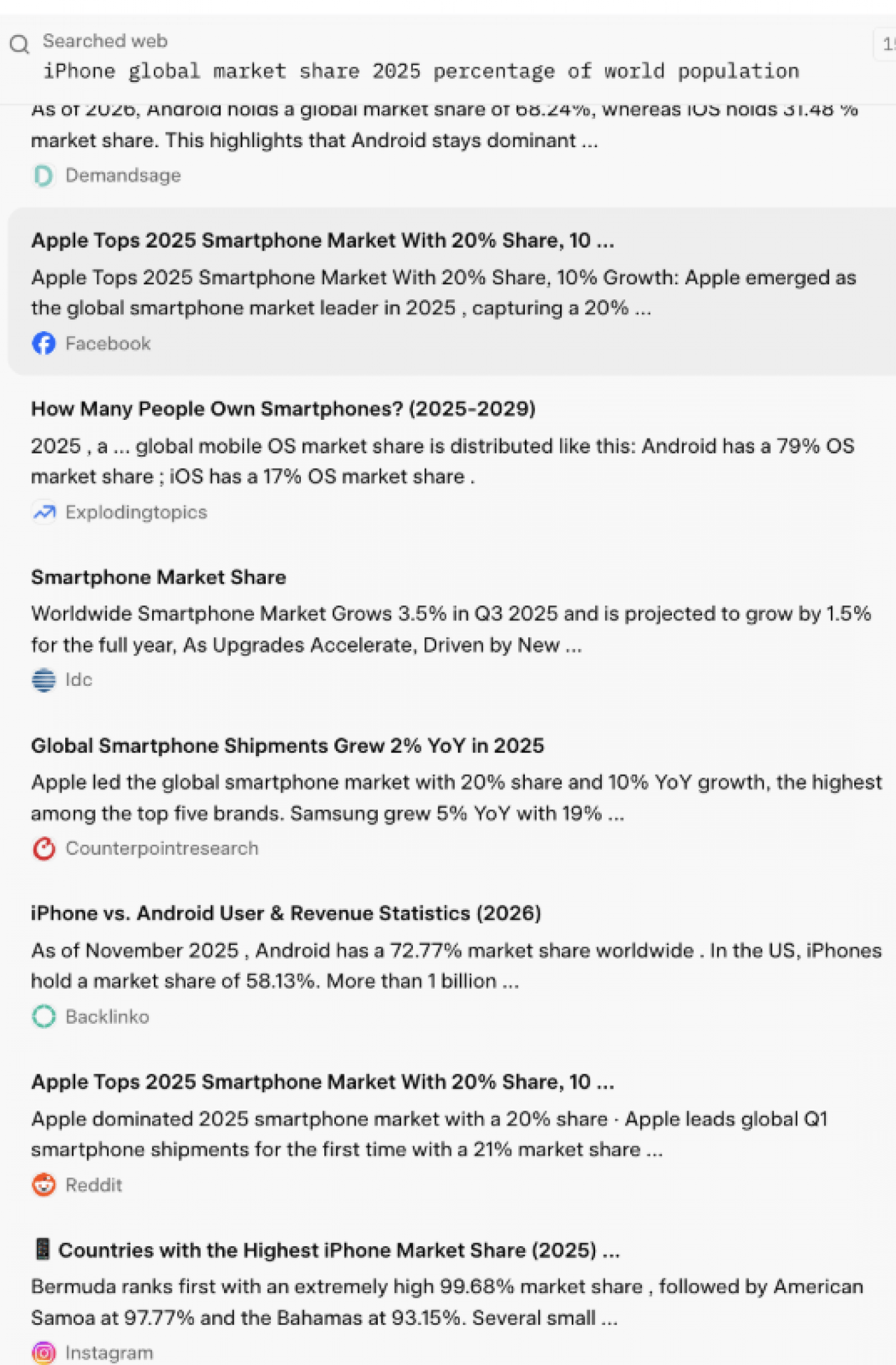
- The percentages vary from 18% to 32% depending on the sources and variables. The most common answers were around 20% and around 29%, which is quite a range.
- Gemini used just four high-quality primary sources that specifically gather and study data.
- Copilot used five sources, including MSN (news) and AppleInsider.
- Grok used 45 sources, many from social media like Facebook, Instagram, and Reddit, which focus on opinions rather than facts.
- ChatGPT used three sources, including DemandSage (business statistics) and 9to5Mac.
- Perplexity used 10 sources, including research and marketing data websites.
Conclusion:
Gemini used the fewest sources that were either primary sources or from reliable websites with valid credentials. Copilot and ChatGPT also used only a handful of sources that combined websites specializing in Apple content and those that gather data and conduct studies. Perplexity used a higher number of sources of equal credibility to Copilot and ChatGPT. Finally, Grok used the most sources, but many were less-than-reliable social media posts that are unverified, as they can be written by anyone without any fact-checking or regulations.
The Overall Best AI
As you can see, there are many ways that a user can rate an AI assistant, and this part is very subjective. If I were forced to pick just one AI tool to use for the rest of my life, I would go for Gemini because it gave me the overall best results in all areas, plus it can generate a limited number of videos for free! In fact, the free version of Gemini can do so much more than the free versions of the best AI apps, including ChatGPT. The complaints I had over embellishments can be fixed with better prompts, like adding "don't change the original image" to your request. After doing all these tests, I don't think any less of ChatGPT, but it fits the age-old saying, "Jack of all trades, master of none."
Don't forget that the user's ability is also a huge factor, because there's only so much even the best AI tool can do without a strong prompt, because AI can't read your mind, at least for now... The importance of prompts is especially true for generating images and text from scratch. I didn't demonstrate those examples in this article because all AI assistants can do it, but the quality depends on the prompt you provide. I do recommend that you test out various prompts on these best AI agents to see what works best for you. And don't be afraid to explore the lesser-known AI apps; some specialized AI tools have niche features that you might be missing out on if you focus on the most popular platforms.
FAQ
- Is Gemini better than ChatGPT? In my opinion, yes. The free version of Gemini can do a lot more than the free version of ChatGPT, including generating videos. While Gemini is my go-to AI assistant, I would use Perplexity to do research that requires accuracy or Grok if I wanted to have a chat that isn't overly careful about being offensive or censored.
- Can you transfer "memories" from one AI to another? Yes! If the only thing that's holding you back from leaving ChatGPT is all the prompt history and customization, you can always export that data from one AI and import it into another.
- What is the best AI tool for writing? It depends. With precise and detailed prompts, any AI app can generate decent content for you. I enjoyed the way Perplexity rewrote my own writing the best, but when generating text from scratch, no app stands out to me personally. According to the public, Claude is considered to be the best for writing, especially for longer texts.
- Which AI does Siri use? For now, Siri runs on Apple's very own Apple Intelligence, but Apple has announced that it will run on Google's Gemini in the future.
- What is the best NSFW AI tool? Grok is known to be the least censored, although there have been recent changes based on stricter laws surrounding privacy and consent. Most AI apps have the ability to use swear words as well as research/generate content that wouldn't be appropriate for the average workplace or public forum.
Top image credit: Thapana_Studio / Shutterstock.com