Just like a human assistant, an artificially intelligent helper needs to be trained before it can actually be of real value. I'll go over the different types of information that can be shared with your AI assistant for best results. Plus, I will give you real-life examples that can help you out if you get stuck.
Why You'll Love This Tip
- Aside from actual app settings, there are other ways to personalize your AI assistant.
- Knowing certain personal information can help your AI app respond appropriately to various requests.
8 Steps to a More Personalized Chatbot
When it comes to interacting with AI apps, knowing how to properly teach it can make or break your experience. Because AI assistants can do so much, to get what you, specifically, need from them, it can really help to convey who you are as a user, what you expect from your AI app, and the type of responses you want to receive.
1. Check out the existing settings and fine-tune them.
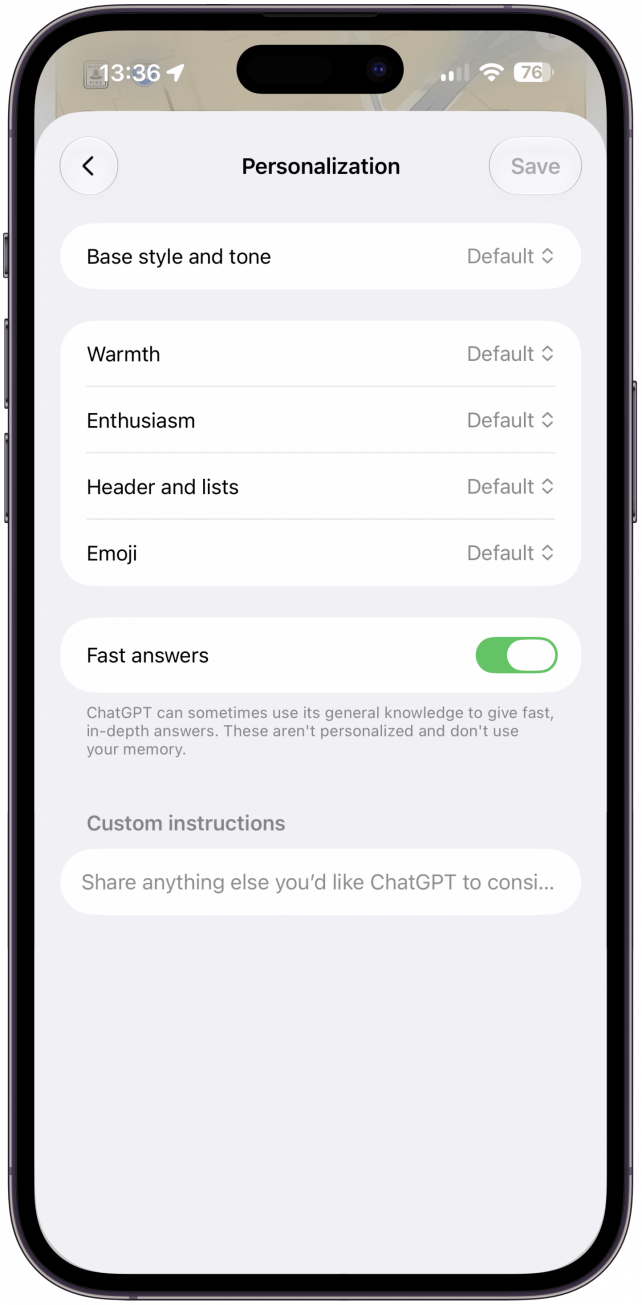
Every AI app or website has different settings options, but it is always important to explore what's available and see if changing any settings can improve your experience. Depending on the AI assistant you are using, the possibilities vary. When it comes to ChatGPT, for example, not only can you customize the literal voice you want used when the AI "speaks" to you, you can also adjust the tone of the written responses down to the level of warmth and enthusiasm. As a millennial, I also love that you can tell your AI assistant to use emojis or not. Even if there's not a toggle for this in the settings, it's possible to request that your LLM use emojis when it responds to you.

* This article is from our Tip of the Day newsletter. Sign Up. *
2. Introduce yourself properly to offer personalized context.
Understanding who you are helps your AI assistant serve you the best it can. The types of things you might want to share with your AI assistant include your profession and areas of expertise, your hobbies and interests, an outline of your day-to-day schedule and the tasks you need to perform, and anything else that might be relevant. Having a plan for what you want your AI assistant to do can help you decide what information to provide. If you hope to get recipes and cooking inspiration, you'll want to share any allergies as well as food likes and dislikes.
Don't forget that AI can analyze documents, so you could upload your resume, a link to your LinkedIn or social media profile, and anything else that might offer valuable information about who you are. Plus, knowing background information about you can save you time if your prompt or question needs additional facts, like your birthday. You don't have to worry about giving it all the facts off the bat, any time you think of something else you haven't shared yet, just let your AI assistant know! Of course, some AI users prefer to be more private, and that's ok too. At the end of the day, the more your AI assistant knows, the more useful it can be, but if you're willing to do a little more legwork and independent research, you don't need to share things like your schedule or workplace, if you feel that doing so would be too intrusive.
3. Explain your ideal conversation style.
Humans have varying conversation styles, and your AI assistant can adapt based on your needs. You can explain whether you'd like to receive responses that are professional, friendly, humorous, explicit, or consisting of slang and emojis. You can also ask that your chatbot respond to you with the same degree of expertise as a university professor or the wide-eyed wonderment of a middle school student (if, for instance, you want to practice teaching something to it). You can specify how encouraging your AI assistant should be and any specialized knowledge you'd like it to focus on when discussing niche topics, etc.
It can also be helpful to share the expectations you might have for using AI. For example, "I would like to use you to improve my productivity while saving me time."
You can also direct your chatbot to prefer shorter or longer responses, to give you examples or step-by-step instructions, and to respond using bullet points, tables, or visuals. Don't forget that, in addition to letting your AI assistant know what you want it to say, you can also request that it avoid certain words, politics, religion, or anything else you want it to avoid.
4. Go over your preferences and set boundaries.
Depending on what you'll use your AI assistant for, this step will look very different for different users. If you mostly use your AI app to bounce ideas off of, or help you understand social situations, you might want to keep things open-ended. However, if you are mostly using it for research or work, then you'll want to specify that you want factual information that's relevant and supported by credible sources. Since AI is capable of having "hallucinations" (times when AI produces responses that aren't based in reality), you might also want to include a prompt like, "Make sure to never make up any information. If you aren't certain about the answer, be honest and only share true, verifiable facts." While it seems silly to have to do this, it can help prevent AI from giving you false information. Even given this prompt, though, AI hallucinations are not 100% preventable, which is why you should always fact-check AI.
5. Share any long-term projects and goals that might be relevant.
It might seem strange to share your deepest hopes and dreams with a piece of technology, but it could really help your AI assistant be more helpful. For example, my AI apps know that I am a writer and, in addition to writing tech how-tos, I also write children's books. Having this information could help if you are using AI to help you organize your schedule, so it can suggest/include writing time, or whatever you may need to do to achieve your goals. As humans, it can be hard to think about our long-term projects on a day-to-day basis, but that is an area where AI can help by reminding, motivating, and even scheduling the small tasks needed to fulfill our dreams.
6. Teach the AI your writing style so that it can replicate it.
If you use AI to help you write, then you'll want to make sure that it sounds like you. Whether you are using your AI assistant to help you answer a text from a love interest, ask for time off at work, or create a script to pitch your latest book, you'll want to share as much information about your writing style as you can. My preferred way to do this is to upload examples of things I've written. You could also specify if there are certain words or punctuation you want to avoid using or if you want the generated writing to include humor in certain situations. Do keep in mind that using AI to write can be controversial, and it can sometimes be very obvious. My tip, if you do have AI write anything for you, is to read it over and make sure it sounds like you actually wrote it. Even if you don't want AI to write things for you, it can be a good idea to share your writing style just so that it understands you even better.
However, before you upload any of your own writing, keep in mind that the AI will certainly be using your words to train itself, and it can then use what it's learned to generate AI-"written" prose. Many authors feel that AIs scraping their works to generate "new" stories, essays, or poetry is tantamount to plagiarism. So consider what your level of comfort with AI appropriating your words is before uploading any original writing to it.
7. Test your AI assistant to see how it does.
Once you've provided all of this personal information, you might want to test out your AI assistant to see how it does. Try asking questions like, "What do you know about me?" or "What daily tasks should I be doing to accomplish my goals?" Again, this will vary among users because everyone has different needs for an AI assistant. Asking the AI app questions can help you see if there's any information that's missing or incorrect.
8. Add or adjust your preferences when necessary.
If the step above made you realize there are some gaps in your AI assistant's database, you can always add to what you've already told it. Similarly, you can change your preferences, for example, if you requested that your AI speak formally, but you don't like how robotic it sounds, you can request that it change its default communication style however you want. Plus, if something in life has changed, like your job, car model, or relationship status, you can always say, "Please remember that I now drive a Toyota; I sold my Ford" or something along those lines.
Now you know how to personalize your chatbot, no matter what app or website you prefer to use. Next, learn how to write good AI prompts!
Top image credit: Bashar Creates / Shutterstock.com