Enter keypad codes to get phone info
By Anonymous
October 27, 2021
Updated October 27, 2021
By Anonymous
October 27, 2021
Updated October 27, 2021
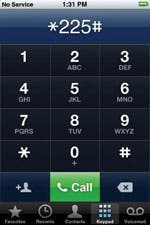 Using your phone keypad, you can type in different codes to get a variety of information about your iPhone. Go to Phone >Keypad, enter the code, and tap Call to access it. Here is a list of codes and what type of information they are for:
- *225# – Get your bill balance
- *777# – Get account balance for prepaid iPhones on the GoPhone plan
- *646# – See your remaining minutes
- *3282# – See your data usage
- *729 – Make a payment
- 611 – Connect to customer service
iPhone Call Settings
- *#21# – Call forward
- *#30# – Incoming caller ID
- *#31# – Outgoing caller ID
- *#43# – Call waiting
- *#61# – Shows number for voice call forwarding when a call is unanswered as well as other options
- *#67# – Checks number for call forwarding when the iPhone is busy
- *#33# – Checks whether barring is enabled or disabled for voice, data, fax, and more
- To find more codes, do a Web search on “GSM codes.”
 Olena Kagui

 Amy Spitzfaden Both

 Leanne Hays

 Rachel Needell

 Rhett Intriago