How to Change Video-Recording Resolution on iPhone
By Conner Carey

Maybe you want to make a video with your iPhone camera, but you don't need it to be high resolution. After all, high-quality videos look gorgeous, but they also take up a lot of storage space. Here’s how to change the video resolution on your iPhone.
Save 5 Percent on Apple Watch at Target
By Todd Bernhard
Don’t Have Live Photos? Use Boomerang by Instagram
By Conner Carey

You don’t need 3D Touch to take a gif-like video, and it seems Instagram saw an open market after Apple's Live Photos release: meet the app Boomerang (free) for capturing short loop videos. Boomerang shoots a burst of 10 images and strings them together to create a mini video. From there, you can share the burst to your phone, Facebook, or Instagram.
How to Turn Live Photos into GIFs
By Conner Carey

Currently, Live Photos can only be viewed from an Apple device running on iOS 9 or later and Macs running OS X El Capitan. Others will see only the still version of the Live Photos. However, iPhone 6s and 6s Plus users are eager for those Live Photos to be shareable beyond that limited circle of Apple users. Here’s how to create a GIF from a Live Photo so you can share it with anyone.
How to Remove Apps from Spotlight Search
By Rachel Needell

Spotlight Search allows you to search your apps but can also be used to search within an app. Each new app that you download is automatically added to Spotlight Search. However, you might not want some apps showing up in Spotlight Search, like the Notes app or the Photos app, in case they have private content.
Adjust Touch Sensitivity to Navigate Your iPhone with Ease
By Conner Carey

Your iPhone has a feature called Haptic Touch that lets you tap and hold certain items to get extra options and open menus quickly. Haptic Touch makes navigating your iPhone faster and more intuitive. However, the default sensitivity can make this feature difficult to trigger or, conversely, too easy to trigger when you're not trying to. Here's how to adjust your iPhone's touch sensitivity.
How to Find Your Kids with Siri
By Conner Carey

Apple's free Find My Friends app allows you to track the location of friends and family members who have given you permission. The feature probably works best for keeping track of teenagers running around town, and Siri is happy to help you locate them.
How to Disable Pop-Up Character Previews on the iPhone Keyboard
By Conner Carey

When typing on the iPhone's keyboard, every character you press pops up as you select it. If you’re not a fan of the feature, it’s easy to turn off.
02746 - video tip
How to Remove Apps from Spotlight Search
By Rachel Needell
Updated 01/16/2024
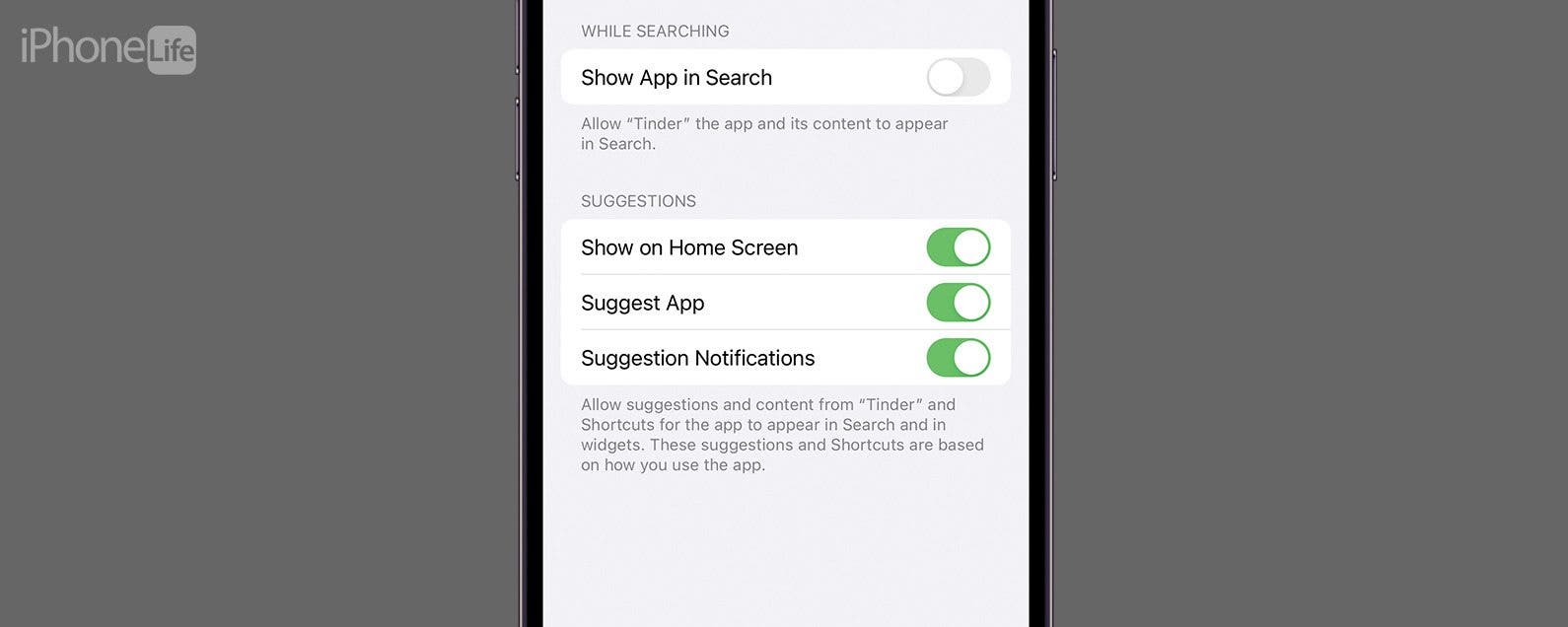
Spotlight Search allows you to search your apps but can also be used to search within an app. Each new app that you download is automatically added to Spotlight Search. However, you might not want some apps showing up in Spotlight Search, like the Notes app or the Photos app, in case they have private content.
Why You'll Love This Tip:
- Avoid irrelevant search results by hiding the apps from Spotlight Search that shouldn't show up in results.
- Keep sensitive apps or information private from Spotlight Search on your iPhone.
How to Disable Spotlight Search on iPhone for Certain Apps
System Requirements
This tip works on any iPhone SE 2nd Gen or newer running iOS 16 or later.
While you can't completely hide apps from the App Library or your iPhone's storage, you can hide them from showing up in a general Spotlight Search. If you like tips about using your Apple devices, be sure to sign up for our free Tip of the Day! Here's how to keep an app from showing up in Spotlight Search:
- On your iPhone, open Settings.
![spotlight search]()
- Tap Siri & Search.
![disable spotlight]()
- Scroll down and select an app you'd like to hide from Spotlight Search.
![spotlight search on iphone]()
- Toggle off Show App in Search.
![disable spotlight search iphone]()


And that's all there is to it! It's super simple to keep apps and app content somewhat private by disabling them from showing up when someone searches your iPhone.
Pages