Apple Pay is slowly being adopted by different retail businesses and banks. To easily find out if Apple Pay is available at a location you plan to visit, you can check in Maps before visiting a store.
By Conner Carey
Easily installed to existing windows, AXIS Gear allows you to control or automate your window shades with your iPhone. The Indiegogo project is looking to fundraise the manufacturing of its product. You can set scheduling to open the morning blinds and lower them at sunset. Control your curtains with or without iPhone via the AXIS gear motor; it's also fully compatible with other smart home systems.
By Sarah Kingsbury
Whether you encounter a link in an email, a text, or while browsing the web, as long as you have an iPhone 6s or 6s Plus, you can use 3D Touch to preview the web page in Safari without actually opening it.
By Todd Bernhard
I was at New York City Comic Con a while ago, and the kind folks from Yogibo had a variety of their comfortable "un-beanbag" chairs available for weary convention goers to try. They are extremely comfortable, in part due to their "zero friction" modules which are less restrictive than traditional beanbag chairs. But I noticed they had smaller, pillow-sized items.
By Conner Carey
When you open a new tab in Safari, it gives you suggestions for frequently visited websites. This feature can be turned off in Settings.

If Facebook is draining your battery, gobbling up your storage by caching huge amounts of data, or otherwise causing problems on your iPhone, you can delete the app and create a Home screen icon for the website instead.
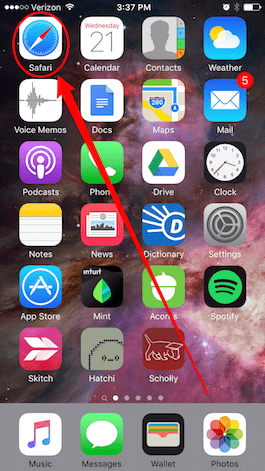
To do this, open Safari and log in to Facebook. Tap the Share icon.

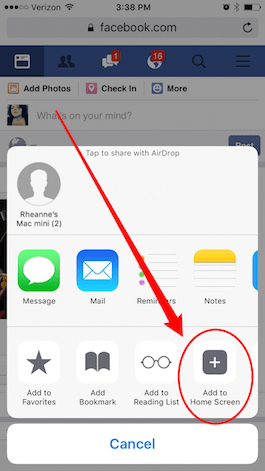
Select Add to Home Screen. A Facebook icon will appear on your Home Screen and you can use that to browse Facebook anytime you like.
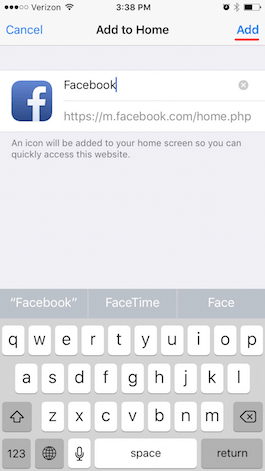
It even looks the same as the Facebook app icon:

Now you can delete the Facebook app by pressing and holding the app icon until it jiggles, tapping the 'x' in the corner, and then pressing the Home button once.
Top Image Credit: d8nn / Shutterstock.com
By Conner Carey
It’s easy to forget about Etsy when you’re looking for tech accessories. The make, buy, sell e-store focuses on vintage or handmade items usually sold by individuals or small businesses. You’ll often find great prices paired with high quality goods plus you’re supporting artists. Step with me into the rabbit hole of Etsy iPhone docks.
By Conner Carey
Siri tracks your iPhone habits, including who you contact, which apps you use, and where you are in order to provide Siri Suggestions in Spotlight Search. However, if you’d rather Siri didn’t anticipate your every search, you can turn off Siri suggestions.
By Conner Carey
Apple has been on a commercial releasing frenzy, which would be irritating if they weren’t so darn short and cute. This time, the company is featuring the new iPhone 6s, likely getting ready for the holiday season. I don’t mind; watching Bill Hader eat a sandwich and talk to Siri is my kind of commercial.
By Conner Carey
Depending on how long you've had an Apple device, you may remember that you had to tap the Edit button to delete alarms in the native Apple Clock app. Now, it's even easier to delete an alarm. Keep reading to find out how!