iPhone Life - Best Apps, Top Tips, Great Gear


Find Out If Your Data's Been Compromised
(Sponsored Post) By Amy Spitzfaden Both on Thu, 09/03/2026


Your iPhone cannot replace a real doctor, but it can help you identify your mental health risks in just minutes. You can use the Health app to take a quick quiz that will let you know if you have any risk of experiencing anxiety or depression. You can easily share the results of these quizzes with your primary healthcare provider to consider any potential next steps.
How to Check Your iPhone Screen Time Report
By Rachel Needell

Want to know how to check iPhone usage history, including recent activity like your Apple purchase history, Safari browsing history, and your Screen Time data? There are a few different ways to check iPhone activity. Here's how to see recent activity on your iPhone and iPad.
Solve Crosswords in the Apple News App
By Rhett Intriago

Apple News has become a reliable news source for many, and with iOS 17, Apple has added a few extra features to make the upgrade to their premium subscription more worthwhile. One such feature is the addition of crossword puzzles.
Apple Watch Hidden Gems
By Rhett Intriago

Apple has packed a lot of power into a small case with the Apple Watch. As a result, many users miss some of the best functions that Apple doesn’t highlight. I’ve compiled this handy list of the coolest features that you might not have heard of to help you get the most out of your wearable.
How to Use FaceTime Gestures
By Rachel Needell

One of the cool new features that comes with iOS 17 is the ability to use your hands to create on-screen reactions that will transform your video call experience. The cool thing about this is, as long as you have installed iOS 17 on your device, this feature will work on any video call service, like Snapchat Video, Facebook Messenger Video, and a FaceTime call with an Android user. Here's how to trigger it!
View a Transcript of Audio Messages
By Rhett Intriago
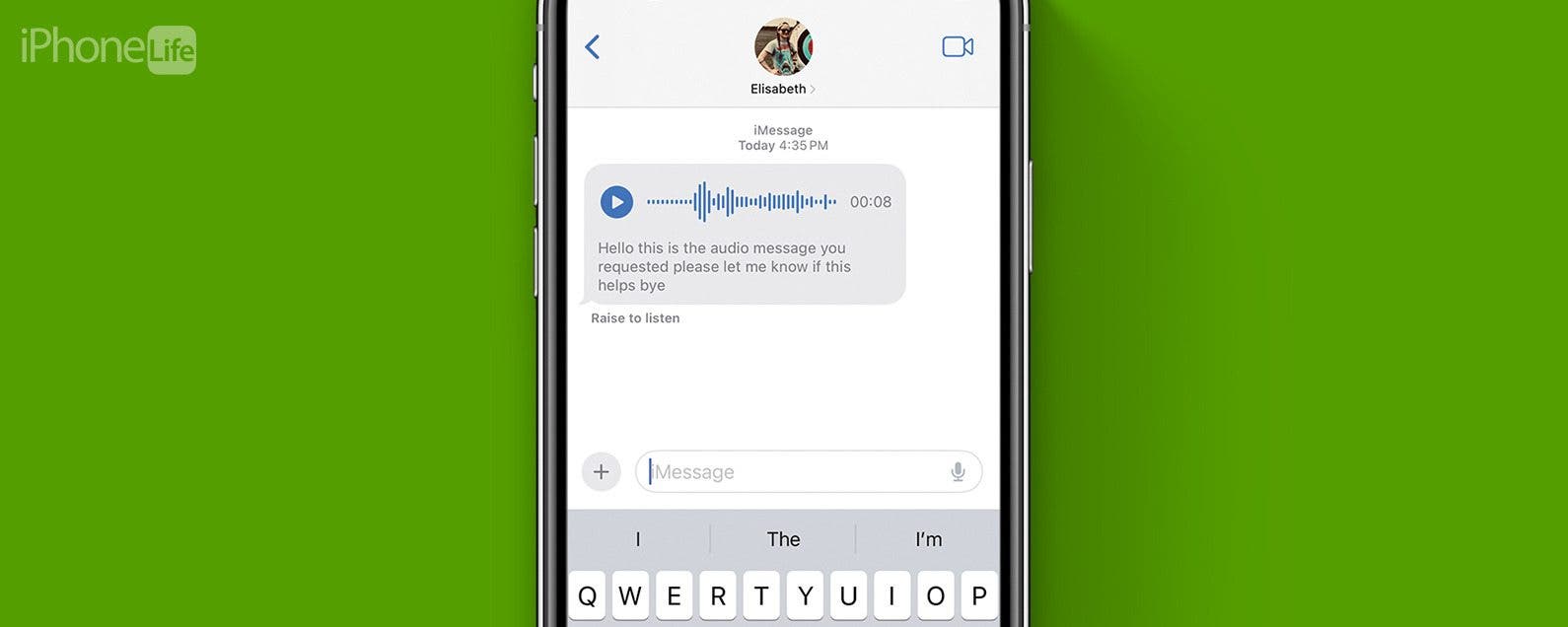
There have been a number of new additions to the Messages app in the latest version of iOS that make it easier to use and navigate. Among those updates, audio messages in the Messages app are now automatically transcribed.
See Real-Time Transcriptions of Voicemails with Live Voicemail
By Rhett Intriago

Ever get a call from an unknown number, but don’t want to pick it up? Live Voicemail is a new feature that takes the iPhone back to the days of answering machines. Now, whenever you receive a call, you’ll be able to see a live transcription of the voicemail message being left by the caller, as they're leaving it.
How to Add Stickers to Photos on iPhone & iPad
By Rachel Needell

How to Create Custom Photo Stickers on iPhone
By Rachel Needell

The Custom Photo Stickers is a fan-favorite iPhone feature. With iOS 16, we gained the ability to remove an image from the background of a photo. This takes that concept, streamlines it, and then gives us a bunch of new and fun ways to customize it. Here's how to make a sticker from a photo on iPhone.
How to Set Multiple Timers on iPhone
By Rachel Needell

With the iOS 17, you can now set multiple timers directly in the Clock app without downloading a third-party app. Users are reporting that this feature is a game-changer for cooking, managing kids, or just general productivity. Here's how to use the new feature.
Customize Someone Else's Contact Poster on Your iPhone
By Amy Spitzfaden Both

Contact Posters are one of the most fun new features to play around with, but you might not always want to use the picture someone else has picked out. Whether it's a painful reminder of an ex's new relationship or a picture you find a bit off-color, knowing how to change someone's Contact Poster is a handy tip as your friends go wild with customization. Let's learn how to do it.
Reduce Head & Eye Aches with Screen Distance Alerts
By Olena Kagui

It can be easy to get distracted and unknowingly damage your eyes by holding your iPhone or iPad's screen too close to your face. iOS 17 introduced automatic alerts that remind you to hold your device at a safer distance, which reduces eye strain and can prevent headaches, bad posture, etc. Enabling these alerts can even help you build better habits over time.
How to Tag Cats & Dogs in the iPhone Photos App
By Olena Kagui

Pets are part of the family, and with iOS 17, you can finally add cats and dogs to the People album! We’ll teach you how to get your Photos app to identify the pets in your photos as accurately as possible. This lets you search for specific pets among all your photos and even create pet-specific Memories.
How to Share AirTags with Family & Friends Safely
By Olena Kagui

The frustration of not being able to share an AirTag location with family and friends has finally ended! Anyone running iOS 17 or later on their iPhone can safely share AirTags with up to five other people. Because only the shared AirTag location is tracked by the group, it's possible to share AirTags, even outside of an Apple Family Sharing group.
How to Change Contact Poster in iPhone Contacts
By Rachel Needell

Contact Posters are a super fun way to let you choose what people see when you call them, so now you can display your favorite photo when calling your friends. I love this new feature and have already been experimenting and playing around with all the customization options. Here's how to do it!
How to Turn Off Screen Distance Notifications on Your iPhone
By Leanne Hays

It's a good idea to leave Screen Distance notifications on for kids, or if you're already suffering the effects of visual health problems like myopia or eye strain. But, here's how to turn off Screen Distance notifications if they're bothering you.

