Become a Human AI Image Detector in 10 Simple Steps

In the last 10 years, Olena has been published in dozens of publications internationally and written hundreds of how-to articles and complex guides about Apple products, software, and apps.
Learn More In the last 10 years, Olena has been published in dozens of publications internationally and written hundreds of how-to articles and complex guides about Apple products, software, and apps.
Learn MoreWhat to Know
- Distinguish AI vs human-made content by focusing on details like text and natural imperfections.
- Learn how to analyze the context and trust your gut when things feel off.
- Understand that even the most accurate AI image detection apps and websites have flaws.
A 2025 study shows that at least 40 percent of the Facebook posts you see today contain AI-generated content. While AI photo detectors do exist in the forms of websites and apps, I can teach you a few easy ways to use your eyes, brain, and guts to easily spot images and videos that were generated using Artificial Intelligence.
Jump To:
- How to Tell If An Image Is AI Generated
- Best AI detector Apps & Websites
- Verify Real Content Using Reverse Image Look Up
- FAQ
How to Tell If An Image Is AI Generated
Artificial Intelligence, or AI, is constantly learning.We’ve gone from some AI content here and there to being bombarded with it across social media, the internet, and even ads. I'll teach you the steps you can take to learn how to perform an AI image check without third-party help.
1. Look closely for the most common AI mistakes: fingers, eyes, and lips.
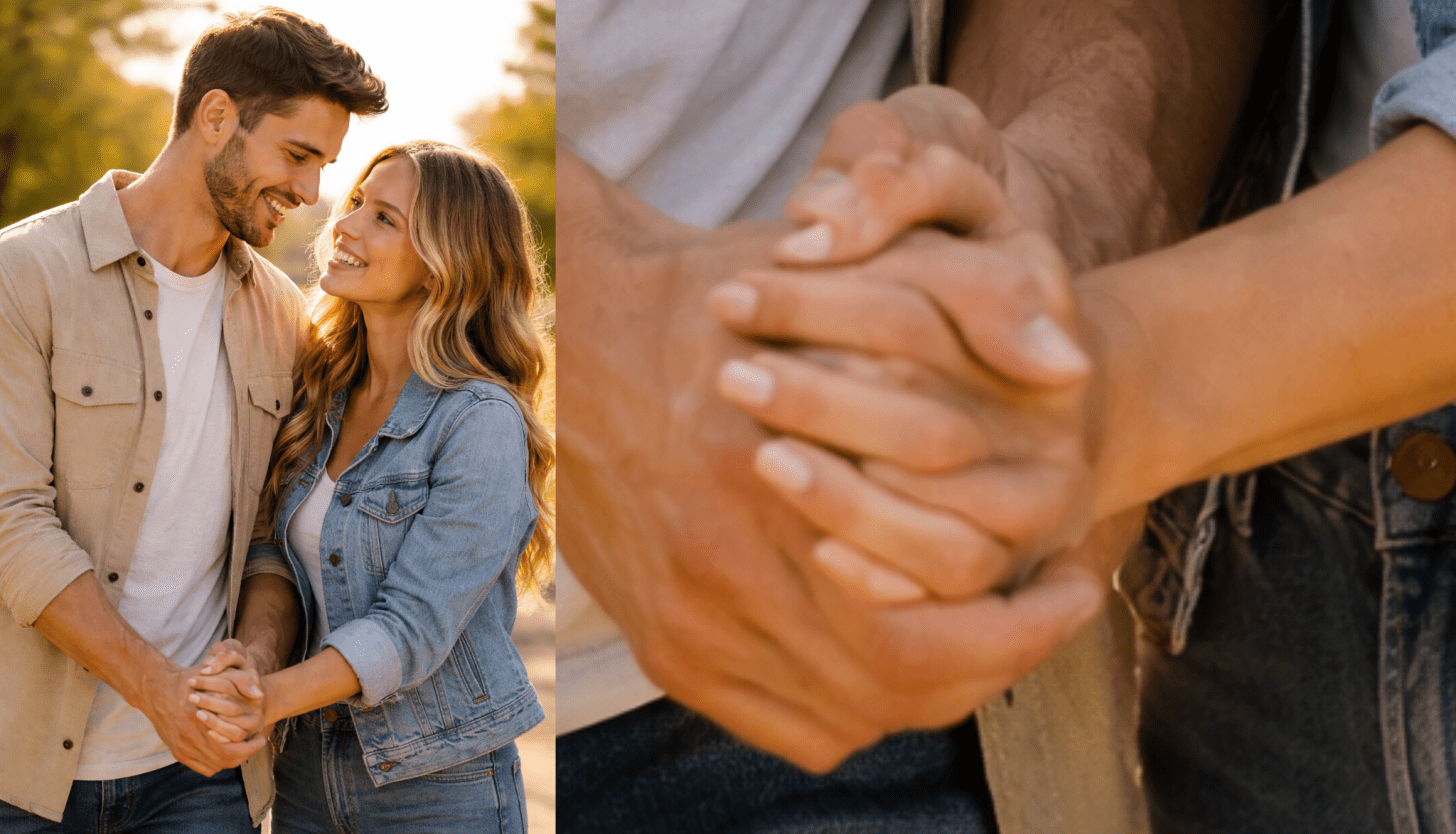
Image generated by ChatGPT 5.2, January 19, 2026, from the prompt "Married couple holding hands."
AI images often look real at first glance, but you can often easily spot computer-generated imagery via the details. Go through this list when viewing an image to see if anything looks out of place. You might need to zoom in for better results:
- Fingers: AI is not great at getting the intricacies of human hands right and will sometimes add extra fingers. Other times fingers may be missing or shown at unnatural angles. Do keep in mind that real people with six fingers exist, as do people with various deformities.
- Eyes: Sometimes AI images will feature soulless looking eyes or get the details or emotions of expressions wrong. Make sure that the eyes are looking where they are supposed to, and check if multiple people in a photo have the exact same eyes.
- Lips: In a video, watch the lips and see if they match the words that are being spoken. Also watch for unnatural or robotic mouth movements. If someone is eating, keep an eye on the food to make sure it’s actually eaten and check for a realistic mess of crumbs or sauce.
It is possible that an AI generated image got all of the details above right, making it harder to decipher. Keep going through the steps to help you identify AI. In the example image above, everything looks ok at a distance, but a closer look at the hands shows us that something is clearly wrong. There are extra fingers and some of the fingers appear out of nowhere and overlap in unnatural ways. If the AI-generated image includes tattoos, earrings, or other jewelry, make sure to take a close look at those to see if you can spot anything strange.
2. Pay attention to any text in the image or video.
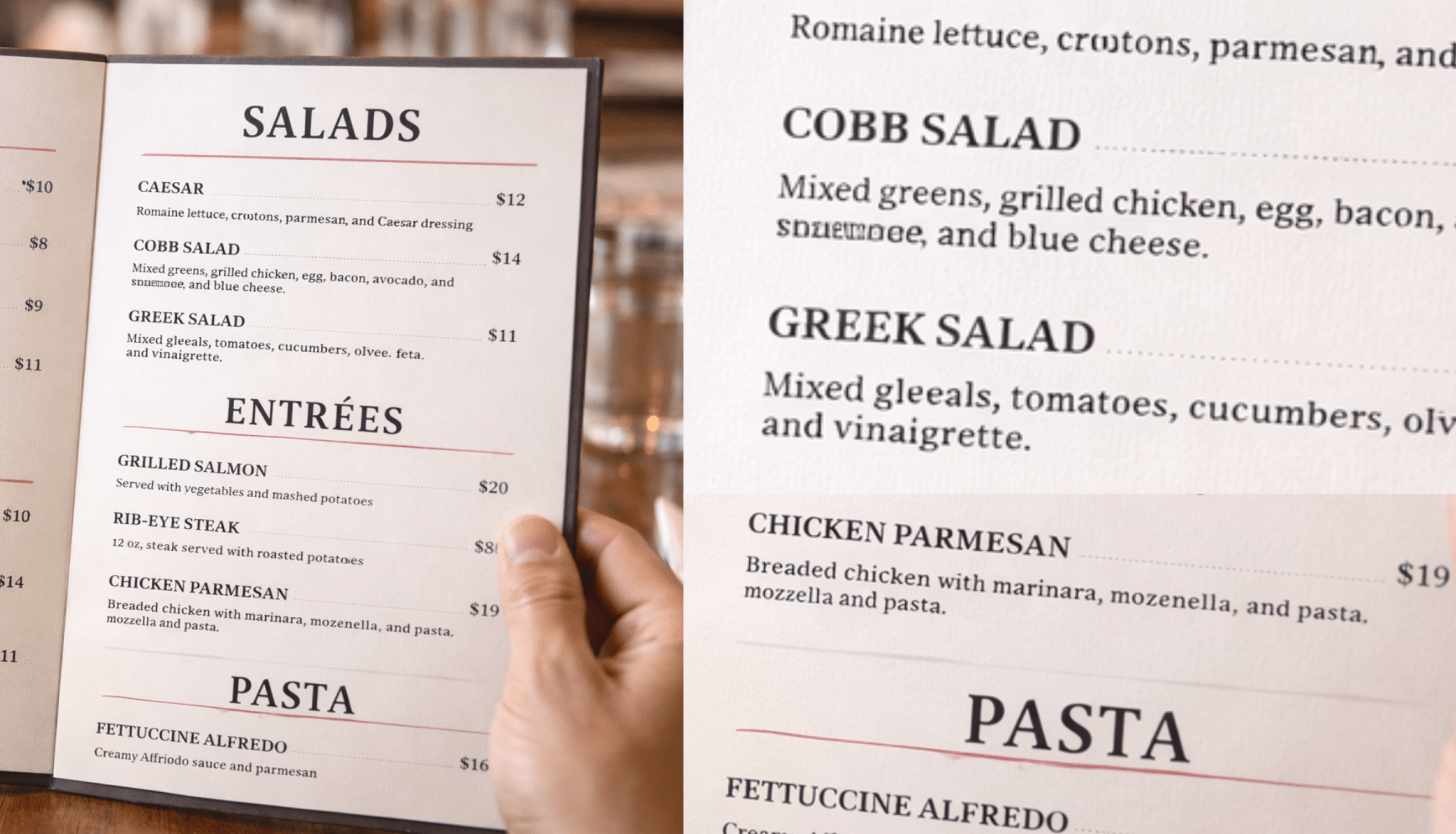
Image generated by ChatGPT 5.2, January 19, 2026, from the prompt "Someone holding a restaurant menu that we can read."
Despite having access to every single word and font in every alphabet imaginable, when AI generates images, it struggles with text. Sometimes the text will be completely gibberish, out of context, or the letters will be strangely wavy. In the example image above, the menu has various mistakes, like "moznella, and pasta. mozzella and pasta." While it is possible for humans to make typos, the repetition and two incorrect spellings of mozzarella are an AI giveaway. You can also spots several places where letters are warped, like the word right under "Mixed greens" which is completely illegible. For more tech tips and tricks, don’t forget to sign up for our free Tip of the Day
3. Pay attention to unnatural perfection.
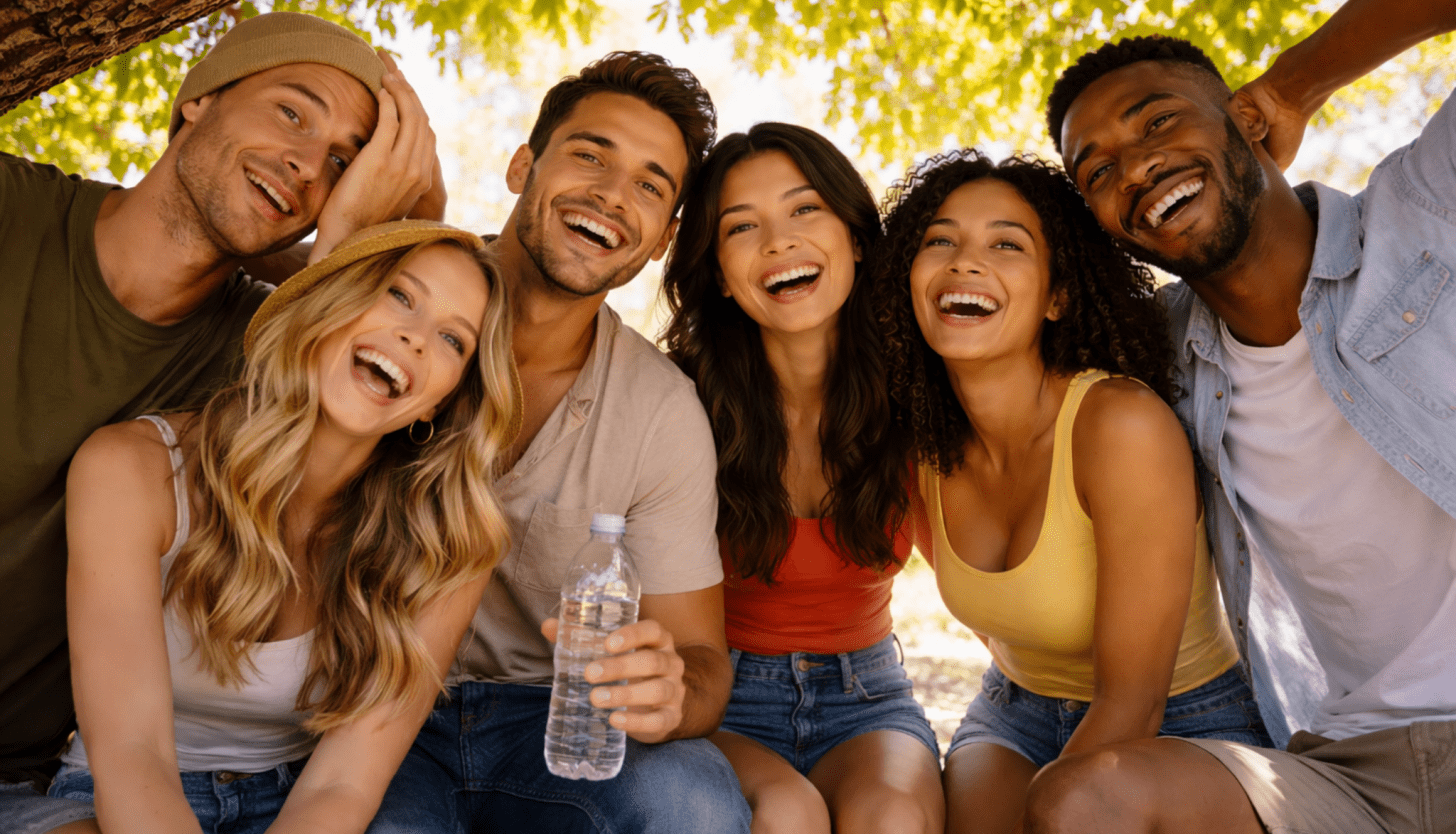
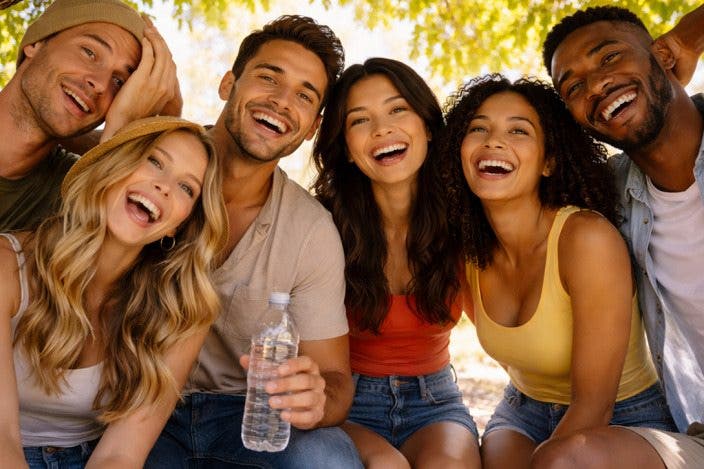
Image generated by ChatGPT 5.2, January 19, 2026, from the prompt "Friends hiding under a tree to get some shade on a hot day."
The way AI works is by taking existing photos, images, art, etc. and synthesizing them into a generated image. With all that airbrushing, AI tends to generate what it considers to be perfect. It can make skin completely smooth, glowing, with no hair, blemishes, or wrinkles in a way that isn’t humanly possible. The same can be true for clothing and fabrics in an image. If skin or clothing appears glossy, as if you are looking at a printed magazine, it was likely generated or altered using AI. Perfection is something to notice in the background too, like fluffy clouds, full trees with all green leaves, etc. In videos, consider textures and consistency and how they impact friction too, for example a car gliding smoothly over a muddy offroad path.
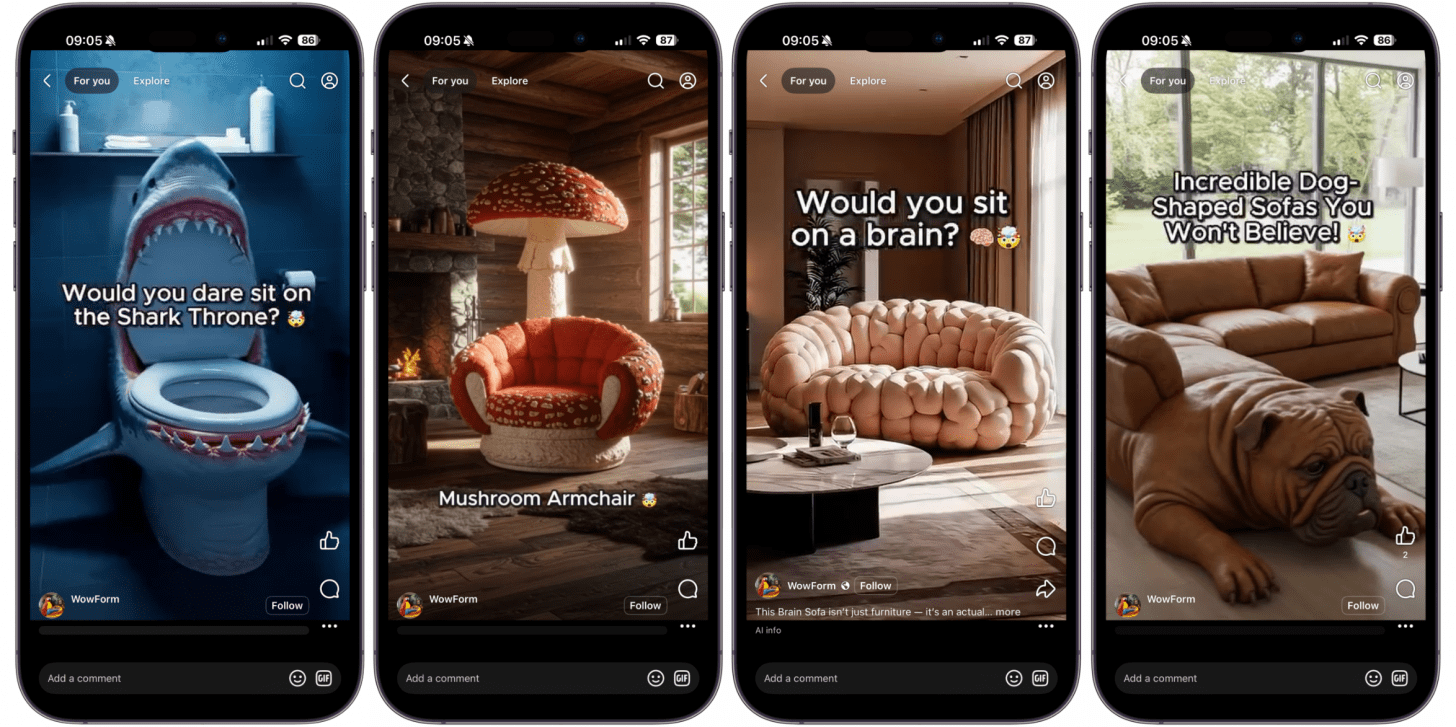
This is especially important when shopping. Notice perfectly clean walls and furniture with no dings or imperfections. AI also likes to create furniture and objects that would be really hard to create in real life and impossible to keep clean, like giant sofas with intricate details like animal faces. Plus, items often look brand new. These too-good-to-be-true items, especially when advertised for a low cost, are likely to be AI. Unfortunately, even websites like Amazon will sometimes feature AI images to sell products. While using AI to create a background for an item being sold isn’t so bad, sometimes the object itself is rendered and looks completely different when you receive it.
When it comes to perfect skin and faces in particular, it is important to keep in mind that AI-powered social media filters and editing apps can alter real photos to make their subjects look unnaturally flawless. One possible way to tell between an AI-edited image and an AI-generated image is that a generated image of a person will likely create perfect golden-ratio facial symmetry, which is extremely rare in real life. If someone's face is a slightly different color than their neck or body, that could be a sign of makeup or a filter, since AI will likely make it all match. In the image above, the group of friends portrayed is of mixed ethnicities, yet they all have the same smile, teeth-shape, and a very similar eyebrow arch.
4. Look out for patterns.
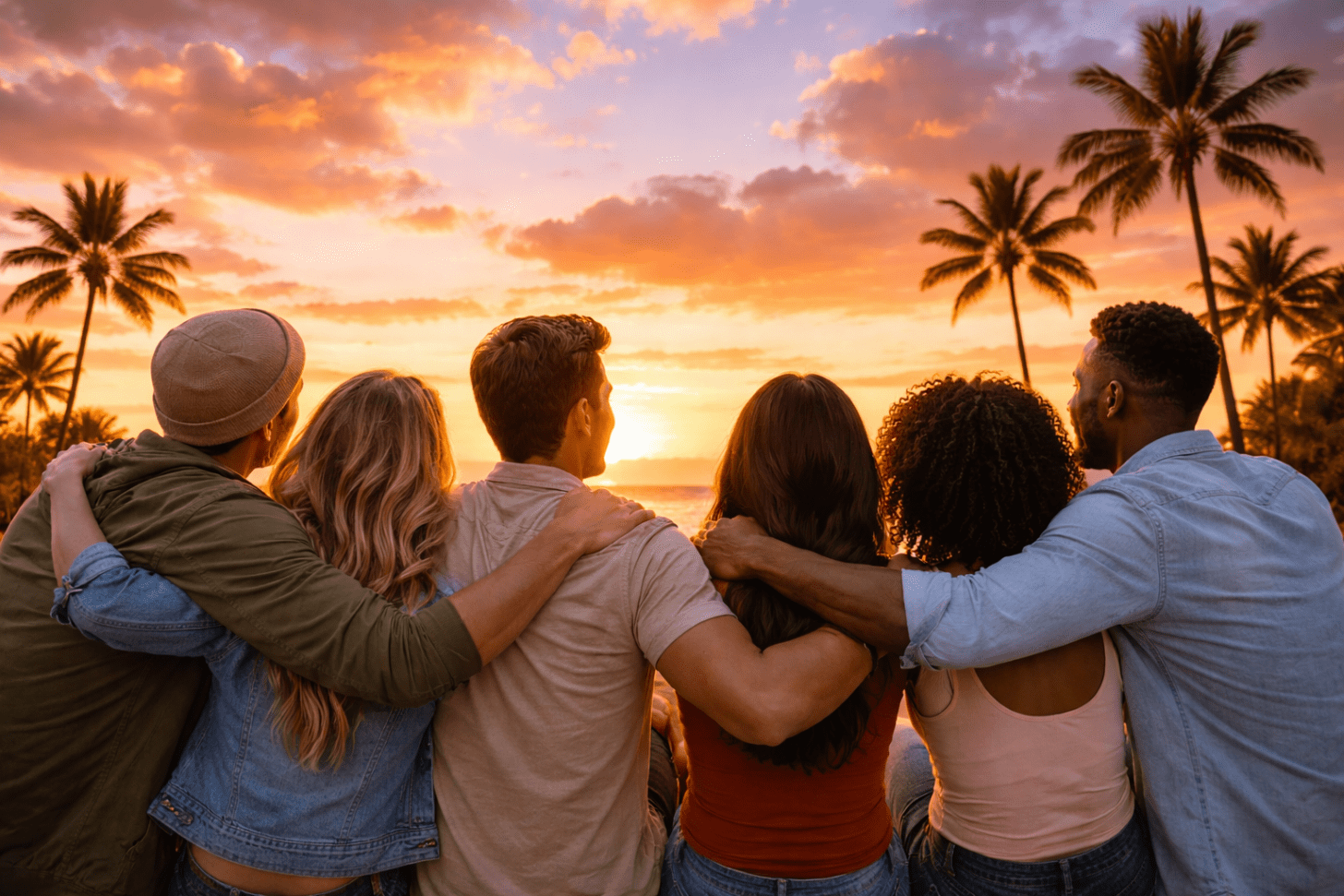
Image generated by ChatGPT 5.2, January 19, 2026, from the prompt "A group of friends enjoying the perfect sunset with fluffly clouds and palm trees in the background."
Unlike a human artist poring over a canvas for hours to get every single detail right, AI is “"lazy" and rushes to create an image that wows. This might mean replicating patterns in fabrics, in the natural background, and even in people. When AI generates a group of people, sometimes they will all have the same shape face and almost identical features. Whenever there are multiples of something, AI can sometimes "cheat" and copy-paste them when possible resulting in an odd symmetry. This is actually good because it helps us identify AI generated people and hopefully minimizes their ecological footprint by using shortcuts to save on energy. Look closely at the palm trees in the background. They are all the same design, copy and pasted and sometimes mirrored.
5. Check the background and reflections for glaring errors.
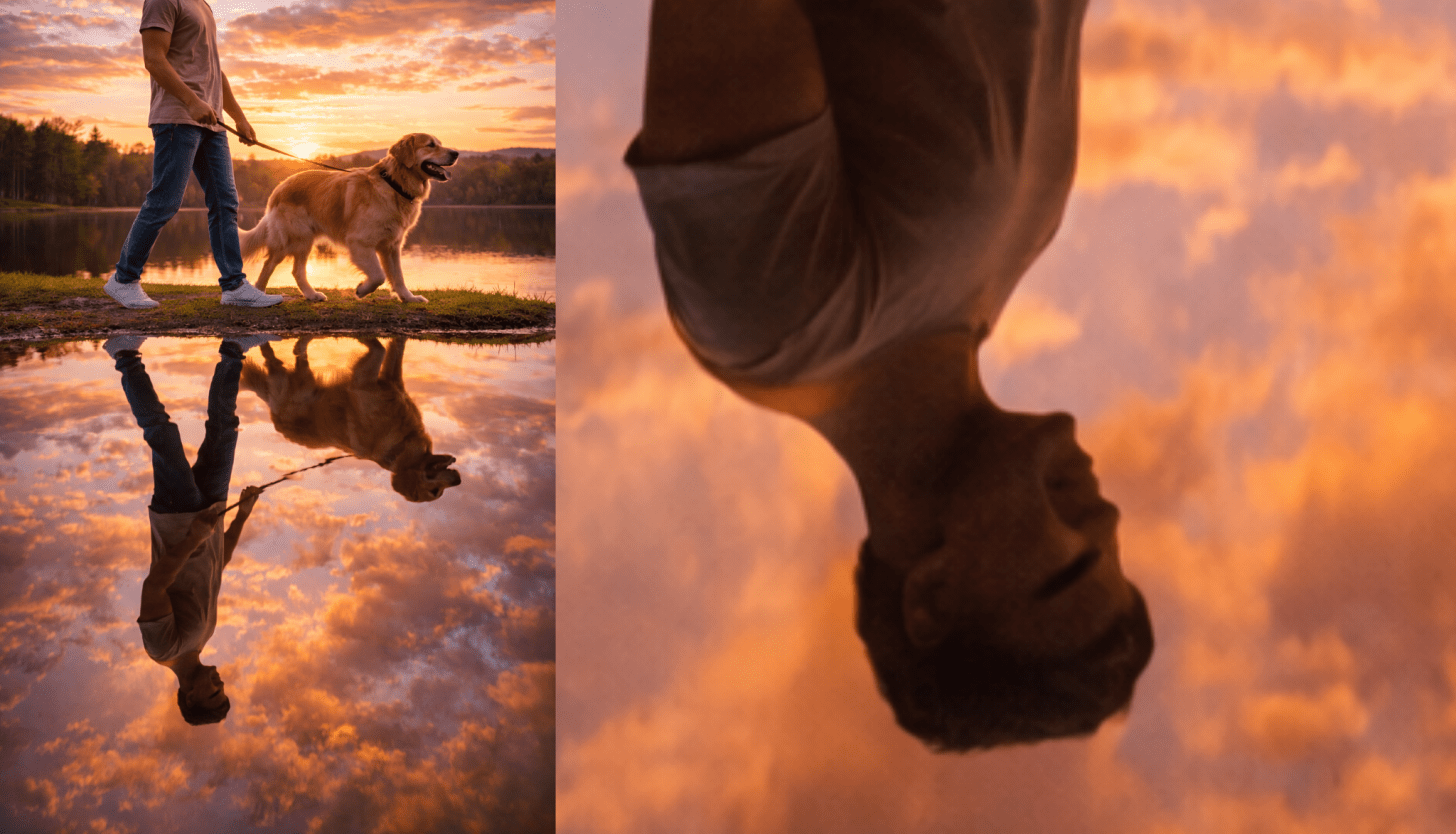
Image generated by ChatGPT 5.2, January 19, 2026, from the prompt "A person walking a dog while showing their reflection in a lake beneath them."
When AI generates a clear subject with other people or items in the background, whatever is front and center gets the most attention and will look the most realistic. If you zoom in on an AI-generated image of a crowd, the closer you look at the "filler," the more obvious it becomes that it’s fake. When I generated the image above, I thought it was pretty good, until I zoomed in on the man's reflected face and saw that it is deformed with an incorrectly placed eyebrow.
6. Look for watermarks and keep a mental list of popular AI app logos and names.
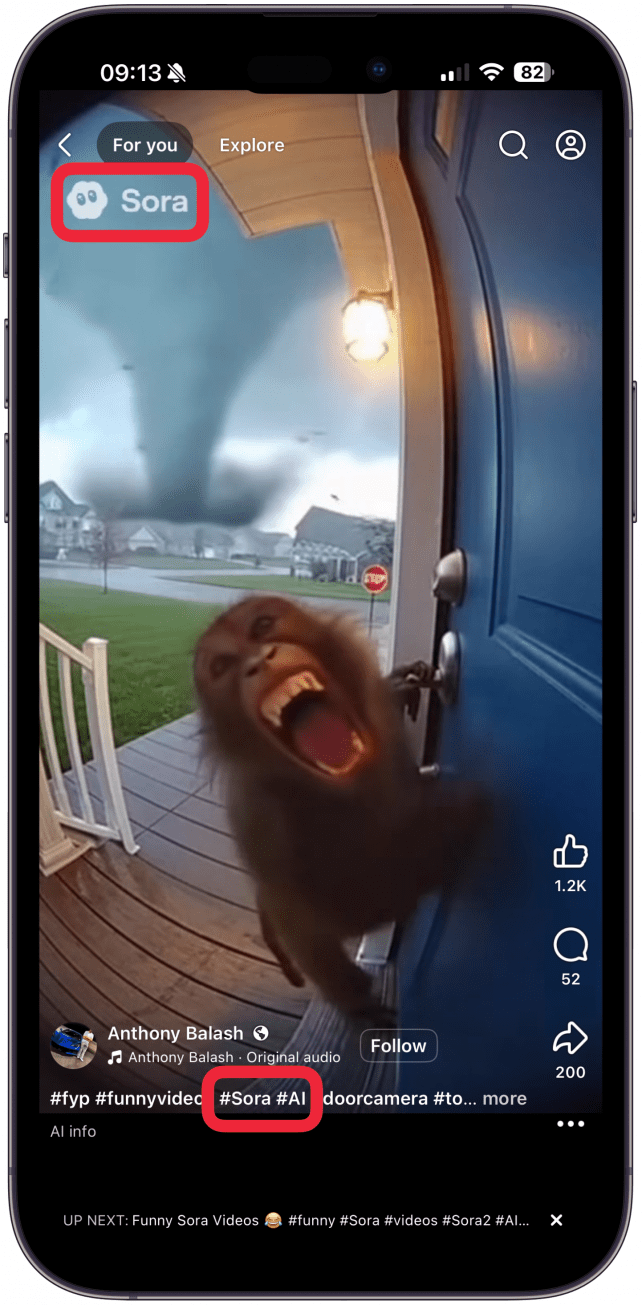
Most AI apps and websites aren't completely free. They generate samples but charge a subscription fee for premium users that lets them generate more images with better quality and other extra features. In order to make money, they will brand what they generate for free with their logo, letting everyone know which app created the artwork or clip. Sora by OpenAI (free) is a popular choice, and it has a light watermark with the text "Sora" that you might notice unless you are looking for it. In addition to watermarks, some social media platforms and websites will label AI-generated content, so make sure to check any attributions underneath the image or video, and look for hashtags mentioning AI or a popular AI app. Sometimes, saving the file to your device will reveal the name of the software that generated it.
7. Consider perspective, light source, shadows, and how objects and people interact.
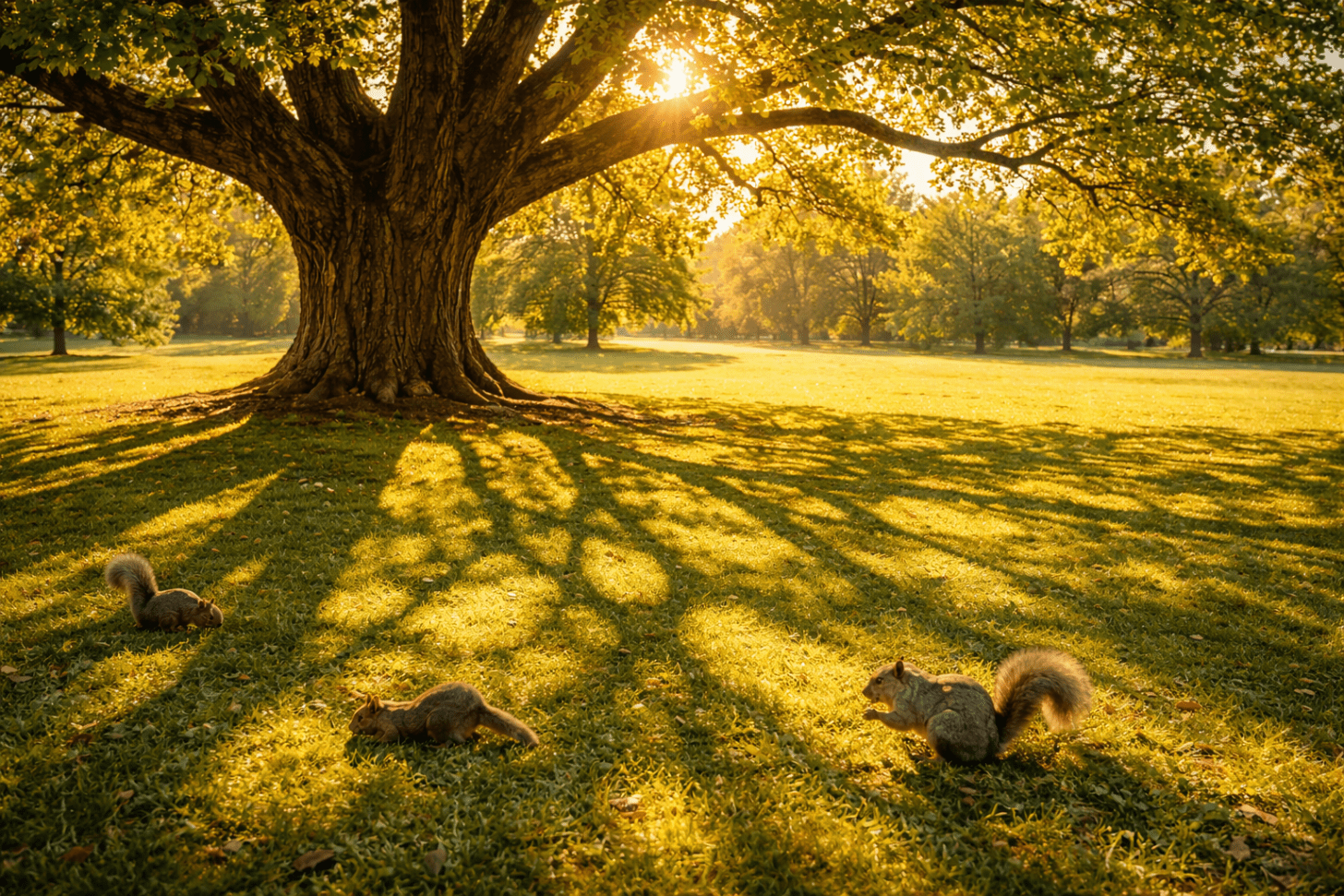
Image generated by ChatGPT 5.2, January 19, 2026, from the prompt "A tree under the sun with an intricate shadow and squirrels grazing nearby."
Not every human being is an artist, but we’ve all seen a lot of art and know more than we think. When wondering, "is this image AI generated," ask yourself questions like:
- Is there a light source in the image that casts shadows?
- Are the shadows consistent and do they look correct?
- Is everything in the image the correct size or are some objects too big or too small?
- Check points of contact between people and objects, is anything off?
- Are any objects going through others?
- Are items merged with the people or animals interacting with them?
- Is gravity working as it should, is there unexplained floating or unrealistic disruptions in momentum?
Another tip is to try to think like someone creating the image or video. Yes, abstract art exists, and some pieces might seem completely random, but most have a clear purpose or message. Take a look at the entire image or video and see if you can understand why it was created and what it is trying to communicate. If it doesn't make any sense, that might be a sign that it was generated by a computer that’s following a prompt rather than telling a story. If you look closely at the image above, you will see that the tree has thick branches while the reflection has many thin ones. Plus, if the sun was that low in the background, the reflection would be way 'taller' and we couldn't see shadows where they are in this image.
8. Trust your gut, consider context, and develop your "uncanny valley" senses.
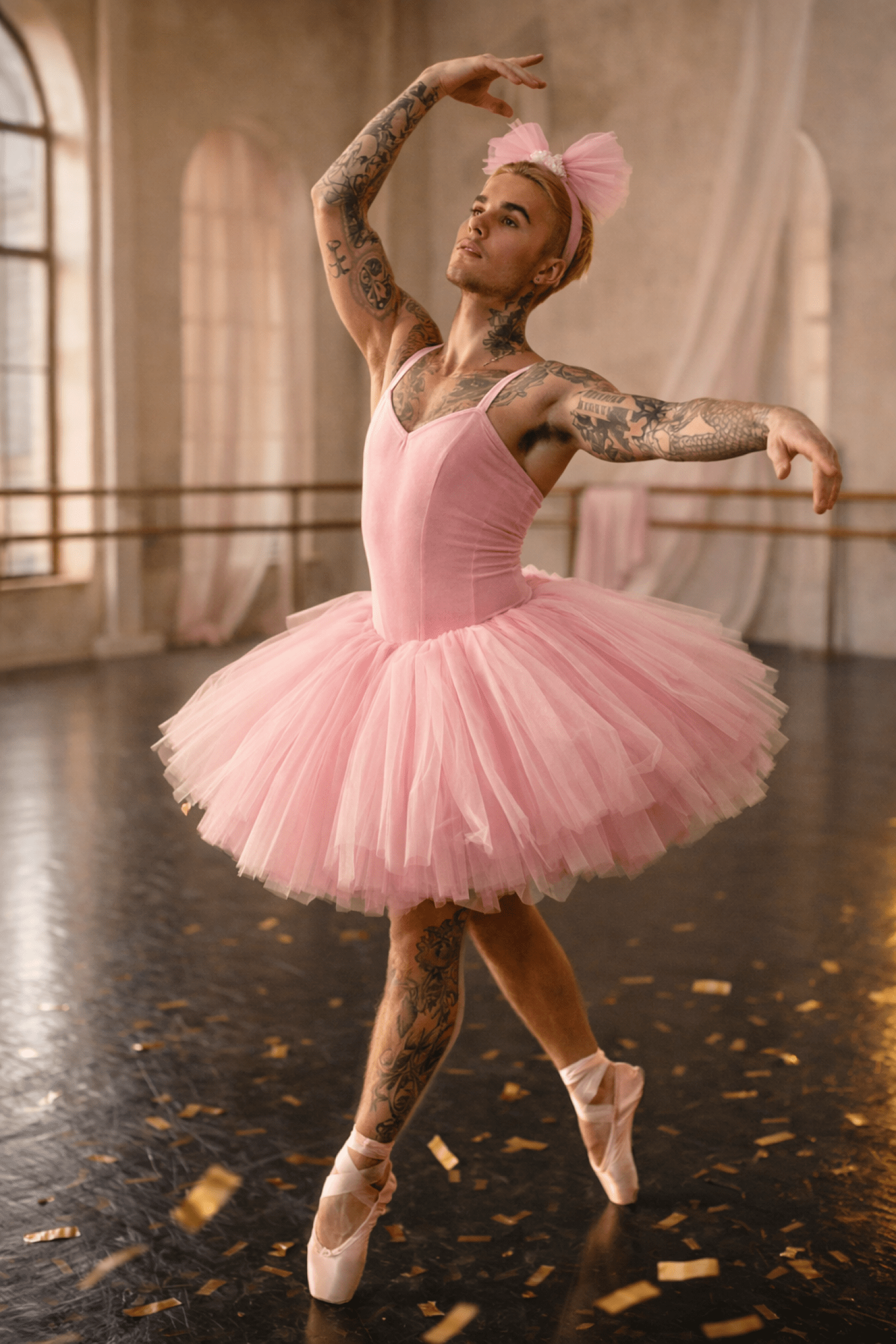
Image generated by ChatGPT 5.2, January 19, 2026, from the prompt "Justin Bieber doing ballet wearing a pink tutu."
It is possible that all of the details above look ok, but something still ‘feels off.’ This is referred to as "uncanny valley," which is a feeling we sometimes get when looking at something that is trying to appear human but doesn't quite get it right. If you've never experienced this, try watching a video of humanoid robots with human faces speaking. If an image or video makes you uneasy or creeped out, your gut may be recognizing artificial intelligence before your brain and eyes catch up.
There are a lot of AI-rendered images and videos of celebrities doing strange or embarrassing things. Just like celebrity rumors are often false, so are the images. Consider the context and see if it makes sense. Would Justin Bieber wear a pink tutu? Unlikely. If in doubt, search on Google and ask "did so and so do/wear this?" When an AI image makes its rounds, there will often be a search result mentioning that something fake is making the rounds.
9. Experiment with AI-generating images.
I didn’t get good at recognizing AI videos or images until I started generating them myself. Try one of the popular free AI apps and try some popular prompts, or ask it to create something unique or even relevant to your life. After you generate some AI content, you will recognize the patterns, making it easier to determine if what you see online is real or not.
10. Check the comment section.
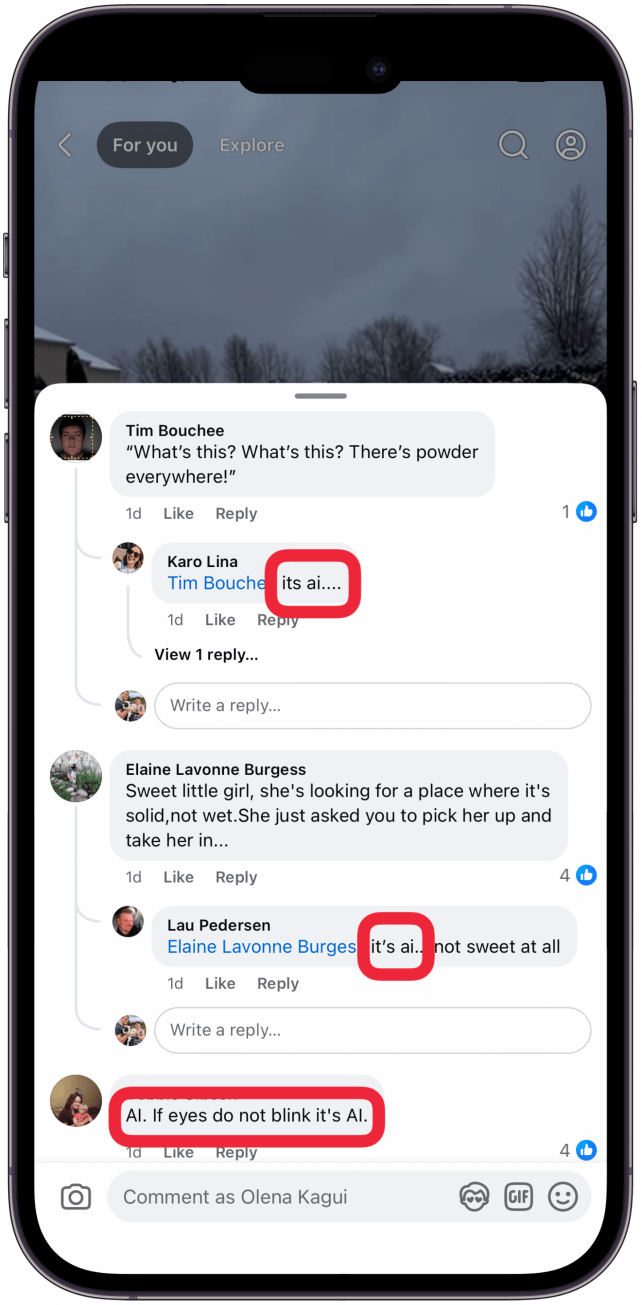
If you see an image on social media, there are likely comments below it. A lot of keyboard warriors like to rightfully call out AI when the poster isn't transparent. I have seen real videos that were labeled as AI so sometimes it takes reading a lot of comments and taking a second look to determine what's what.
Best Free AI Picture Detector Apps & Websites
Just like the old-school plagiarism checker, there are free apps and websites that can flag AI content. Ironically, they usually use AI to detect it, and AI is not always reliable. Over the past few years there have been many stories about artwork being flagged as AI incorrectly, so I caution you when using these tools. I like to use the https://undetectable.ai/ai-image-detector website when I'm on a computer, but the free version has limits and can be controversial because some of the premium features include humanization of AI content, which makes our lives even harder. My favorite AI content detection app is actually ChatGPT because it’s free with limits and I already use it, so I don't need to download a new app. According to the Washington Post, the popular Turnitin program is only 50 percent effective at identifying AI. Other studies show equally bleak results. This is why it's better to learn to detect AI using the steps above.
Verify Real Content Using Reverse Image Look Up
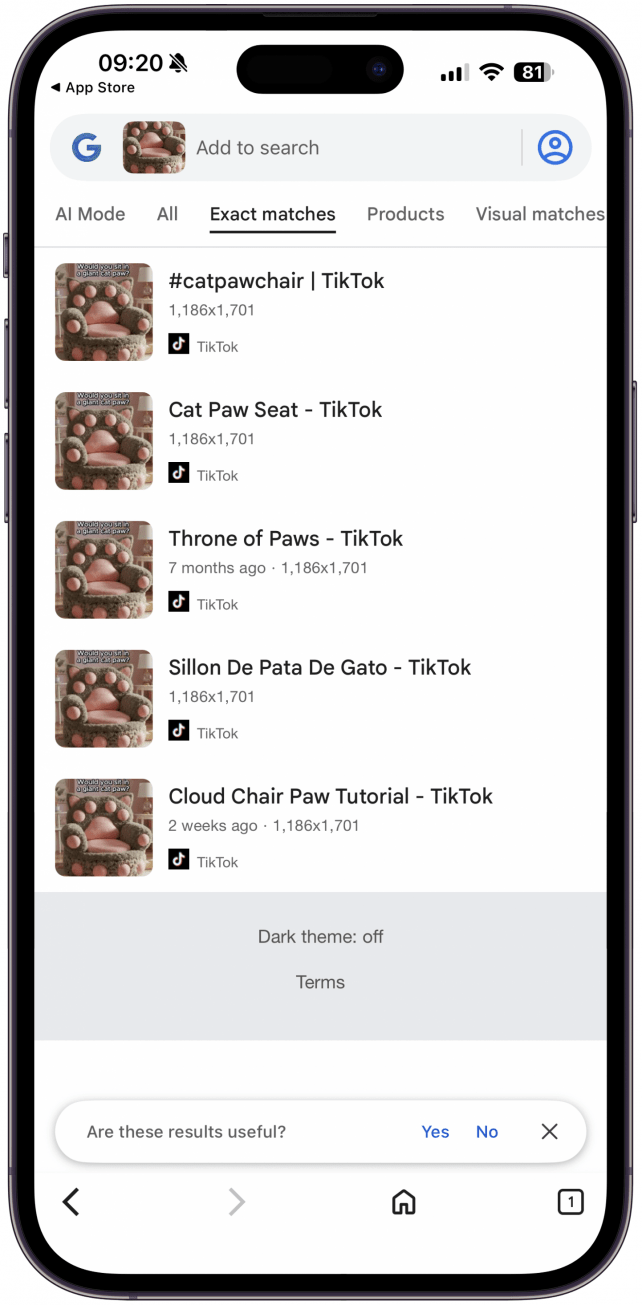
One of the more reliable ways to verify that an image is real is by doing a reverse image search via Google. Doing this lets you see if it has been posted elsewhere and can help determine the original source. You can also search for a story or a video that you find suspicious and add ‘is it real/legit’ to your search terms and see if a website like Snopes or a different source can confirm or deny the authenticity. You would still need to do some digging and analyzing to come to the right conclusion, but it can be better than relying on designated detector apps and websites.
Google can also help you figure out if a fake image is Photoshopped rather than AI-generated. In the age of AI we sometimes forget that there are a lot of fake or enhanced images out there that were not generated using AI but were instead, altered using technology. CGI effects in movies and Photoshop can be used to create things that aren’t real and this can be done by humans using their skills and creativity. Tools like Photoshop and Canva are slowly adding AI features but not everyone uses them just because they are available.
I hope my tips help you feel more confident in spotting bot vs. human content. You yourself can become the best IA image checker! If you want to practice, there are lots of articles that quiz you by showing you similar images where one is AI and the other is not. Eventually, as AI gets better and even more realistic, analyzing the content and using our intuition might be the only way to distinguish artificial intelligence videos and photos from the real thing. It is important to note that social media has algorithms based on the data they've gathered about users so they can tailor content knowing the user's likes, dislikes, political opinions, etc. This is worrisome because altered content can be a powerful persuasion tool and we are all susceptible to confirmation bias.
FAQ
- Are AI detectors accurate? Unfortunately, AI detectors are not accurate and you cannot rely on them. It is possible that as AI itself gets better, so will the detectors.
- What is a deepfake? Deepfake videos are realistic or believable videos created using AI. This type of altered content can replace the face of a random person in a video doing something silly with a celebrity, and can be used for nefarious purposes.
- How to tell if something is written by AI? AI text detectors such as Turnitin can be used to sometimes identify AI but it isn't always reliable and false positives do occur.

Olena Kagui
Olena Kagui is a Feature Writer at iPhone Life. In the last 10 years, she has been published in dozens of publications internationally and won an excellence award. Since joining iPhone Life in 2020, she has written how-to articles as well as complex guides about Apple products, software, and apps. Olena grew up using Macs and exploring all the latest tech. Her Maui home is the epitome of an Apple ecosystem, full of compatible smart gear to boot. Olena’s favorite device is the Apple Watch Ultra because it can survive all her adventures and travels, and even her furbabies.
Related Articles
 Amy Spitzfaden Both
 Rachel Needell
 Rhett Intriago
How to Use Visual Intelligence to Add an Event to Your Calendar
 Leanne Hays

 Olena Kagui