Play a slide show of your photos
By Anonymous
May 27, 2021
Updated May 27, 2021
By Anonymous
May 27, 2021
Updated May 27, 2021
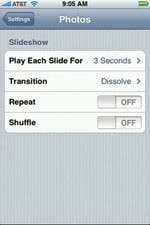 You can easily play a group of photos in a slide show on your iPhone or iPod touch. Go to Photos and tap on an album, then tap the Play button on the bottom of the screen. You can stop the slide show at any time by tapping anywhere on the screen, which will display the photo controls (tap Play to start the slide show again).
If you want to change how the slide show plays, go to Settings >Photos. Here you can choose how long you want each slide to appear, pick a transition, choose to Repeat the slide show (loop it over and over again), and/or choose Shuffle to play the photos in a random order.
You can adjust the settings for slide shows on the iPhone and iPod touch.

 Olena Kagui
 Rhett Intriago

 Amy Spitzfaden Both

 Susan Misuraca
 Rachel Needell





 Leanne Hays