How to Get Rid of Mailbox Priority in Mail App on iPhone


In the last 10 years, Olena has been published in dozens of publications internationally and written hundreds of how-to articles and complex guides about Apple products, software, and apps.
Learn More In the last 10 years, Olena has been published in dozens of publications internationally and written hundreds of how-to articles and complex guides about Apple products, software, and apps.
Learn MoreThings to Know
- iOS 18.2 introduced a new Artificial Intelligence feature that shows Priority emails in the Mail app.
- Some iPhone users complain that this feature doesn't work as promised, while others don't want AI to prioritize emails.
- You can revert to your regular inbox by turning off the Show Priority feature.
iOS 18.2 introduced an Artificial Intelligence feature to the Mail app that is supposed to identify the most important emails and bring them to the top of your inbox. If you are worried about AI's ability to prioritize your emails or simply prefer your old inbox accurately, we'll teach you how to toggle off Show Priority.
How to Turn Off Mailbox Priority AI Feature in the Mail App
If the Mail Priority feature isn't working for you, you can quickly revert back to the Apple inbox that you are used to. Here's how to customize Mail, the default email app on iPhone:
- Open the Mail app.
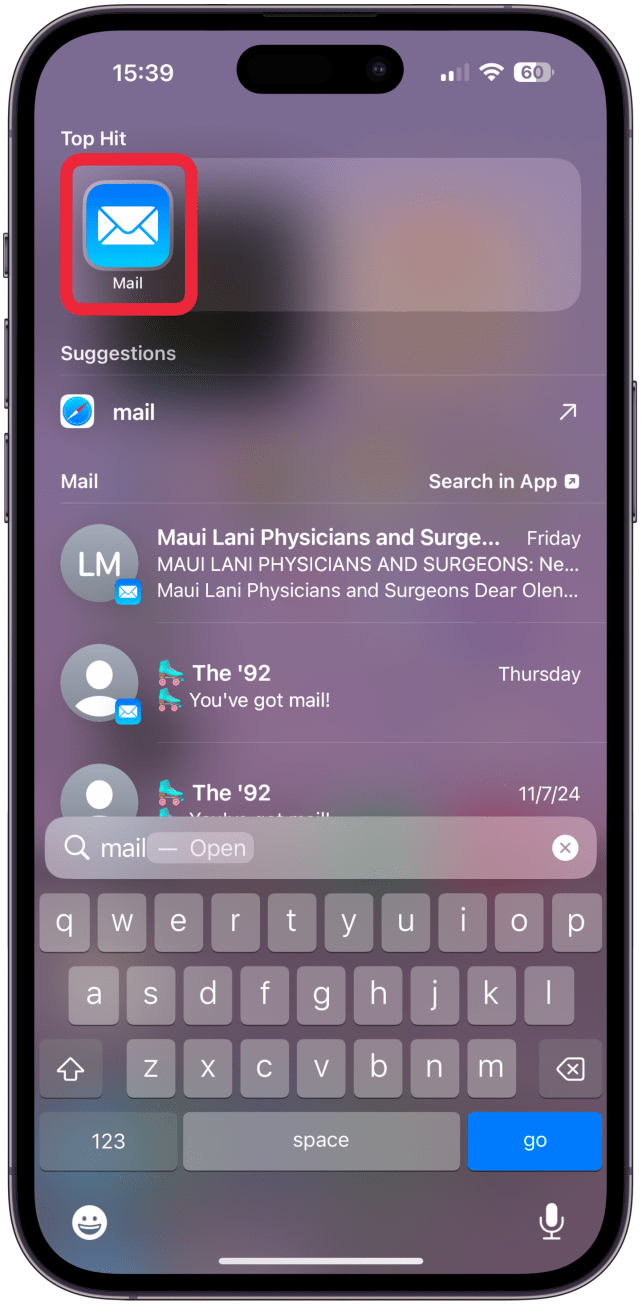
- Tap the More menu (three dots icon) in the top right corner.

- Tap Show Priority to toggle it off.
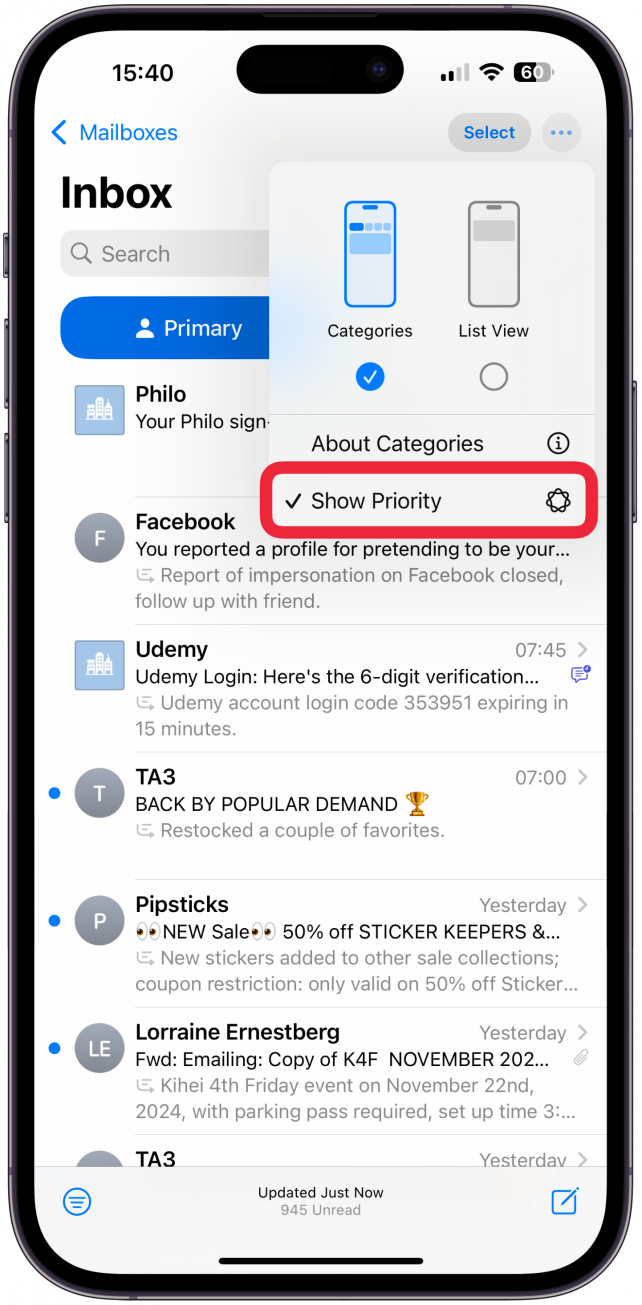
That’s it! Your emails will no longer be shown by priority, but other Apple Intelligence features will still work in the Mail app. For more Apple Intelligence tips, don’t forget to check out our free Tip of the Day newsletter! Next, learn how to change the tone of your writing with Apple Intelligence so that your emails sound more professional, more friendly, or however you prefer them to be.
FAQ
- How to turn off AI on iPhones 15 Pro, 15 Pro Max, and 16? In order to use Apple Intelligence features, you have to join the waitlist, so you will not have access to them until you do this. To turn AI off, go to Settings, tap Apple Intelligence & Siri, and toggle Apple Intelligence off.
- Why is the iPhone Mail app not working? The Mail app not working can be most commonly caused by a bad internet connection, a software glitch, or incorrect network issues.
- How to send high-priority emails in Gmail or Mail? If you want to send an email that someone else's AI will identify as a priority, consider writing "urgent" or "time-sensitive" in the subject line, although there is no way to guarantee that your email will be prioritized.

Olena Kagui
Olena Kagui is a Feature Writer at iPhone Life. In the last 10 years, she has been published in dozens of publications internationally and won an excellence award. Since joining iPhone Life in 2020, she has written how-to articles as well as complex guides about Apple products, software, and apps. Olena grew up using Macs and exploring all the latest tech. Her Maui home is the epitome of an Apple ecosystem, full of compatible smart gear to boot. Olena’s favorite device is the Apple Watch Ultra because it can survive all her adventures and travels, and even her furbabies.

 Amy Spitzfaden Both
 Rhett Intriago
 Olena Kagui

 Linda Ruth


 Rachel Needell
 Ashleigh Page