Tip of the Day: Delete Mail Faster in iOS 8

With two decades of writing and editing experience, Sarah has written hundreds of how-to articles, founded the Daily Tip newsletter, and now oversees iPhone Life’s online content.
Learn More With two decades of writing and editing experience, Sarah has written hundreds of how-to articles, founded the Daily Tip newsletter, and now oversees iPhone Life’s online content.
Learn More
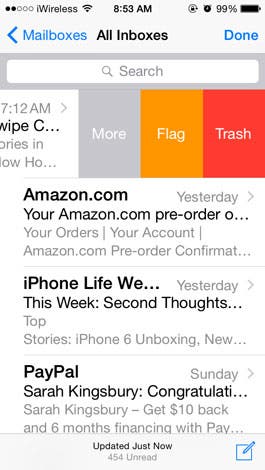
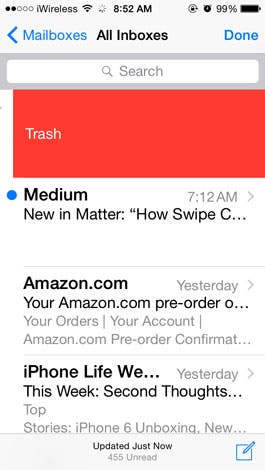
In iOS 7, deleting individual emails from your inbox in the Mail app was a multi-step process. You had to swipe left on the email preview and then choose Delete from the options that appeared. It's much faster in iOS 8.
In your inbox, simply swipe all the way to the left of the screen on the email you want to delete, ignoring the options that appear as you swipe. This is so much faster than any other method of deleting, even for deleting multiple emails, that you may prefer to just delete all your emails this way.
Top image credit: Steve Byland/Shutterstock

Sarah Kingsbury
As the Editorial Director at iPhone Life, Sarah Kingsbury manages the online editorial team and oversees all website content. She is a long-time Apple enthusiast who never goes anywhere without her Apple Watch and owns way too many HomePods. Since joining iPhone Life in 2013, Sarah has done everything from writing hundreds of how-to articles to founding the Daily Tip newsletter. She even co-hosted the early episodes of the iPhone Life Podcast. When not at work, Sarah can be found hiking in the mountains and canyons around Las Vegas, where she lives with her partner and dogs.
 Rhett Intriago
 Leanne Hays
 Rachel Needell


 Olena Kagui



 Amy Spitzfaden Both




 Ashleigh Page