Every Mac Operating System in Order (1984–2026)

In the last 10 years, Olena has been published in dozens of publications internationally and written hundreds of how-to articles and complex guides about Apple products, software, and apps.
Learn More In the last 10 years, Olena has been published in dozens of publications internationally and written hundreds of how-to articles and complex guides about Apple products, software, and apps.
Learn MoreWhat to Know
- The first Mac software was called System 1 and it was released on January 24, 1984, and there have been 30 major updates since.
- Apple rebranded to Mac OS with the release of mac OS 8 on July 26, 1997.
- The first Californian landmark macOS was macOS 10.12 (Sierra) released on September 20, 2016.
Apple has been making Macs since 1984 and both the hardware and software have gone through a lot of changes. I’ll tell you a bit about every macOS update, and the types of Mac software that came before the switch to macOS in 2016. Enjoy our full list of Mac OS versions in order from the oldest System 1 to the latest macOS 26 Tahoe.
Complete List of Mac Software Versions in Order
Here is the list of every major Mac software update in order from oldest to newest. I cover the evolution of how Mac software versions are named and the various rebrands further down in this article.
- System 1 - January 24, 1984
- System 2 - April 1985
- System 3 - January 1986
- System 4 - January 1987
- System 5 - October 1987
- System 6 - April 1988
- System 7 - May 13, 1991
- Mac OS 8 - July 26, 1997
- Mac OS 9 - October 23, 1999
- Mac OS X 10.0 (Cheetah) - March 24, 2001
- Mac OS X 10.1 (Puma) - September 25, 2001
- Mac OS X 10.2 (Jaguar) - August 23, 2002
- Mac OS X 10.3 (Panther) - October 24, 2003
- Mac OS X 10.4 (Tiger) - April 29, 2005
- Mac OS X 10.5 (Leopard) - October 26, 2007
- Mac OS X 10.6 (Snow Leopard) - August 28, 2009
- Mac OS X 10.7 (Lion) - July 20, 2011
- OS X 10.8 (Mountain Lion) - July 25, 2012
- OS X 10.9 (Mavericks) - October 22, 2013
- OS X 10.10 (Yosemite) - October 16, 2014
- OS X 10.11 (El Capitan) - September 30, 2015
- macOS 10.12 (Sierra) - September 20, 2016
- macOS 10.13 (High Sierra) - September 25, 2017
- macOS 10.14 (Mojave) - September 24, 2018
- macOS 10.15 (Catalina) - October 7, 2019
- macOS 11 (Big Sur) - November 19, 2020
- macOS 12 (Monterey) - October 25, 2021
- macOS 13 (Ventura) - October 25, 2022
- macOS 14 (Sonoma) - September 26, 2023
- macOS 15 (Sequoia) - September 16, 2024
- macOS 26 (Tahoe) - September 15, 2025
For more information on every Mac operating system version, tap on the name from the list above, or scroll through the entire list of all Mac OS update write ups in the last section of this article.
The Evolution of Mac Software & Naming Patterns
The current Mac software is called macOS (OS stands for operating system) and it gets a new name and number every year when it is updated in the fall. This was not always the case. It is important to note that Apple has rebranded its software several times and changed the frequency of its major software updates.
The most recent rebrand happened in the fall of 2025 when Applw decided to base the number of every Apple OS on the year in which it is made widely available. To confuse things further, macOS 26 was released in 2025, so it refers to the year in which most people will use it, rather than the release date.
Current macOS versions also have names that correspond to landmarks in California. But the landmark names only started in 2013. Before that, the names were previously based on types of wild big cats. Ironically, there are only five primary species of what we call big cats, yet Apple had nine software versions named after them. The switch to Californian landmarks happened as a marketing tool, since Silicon Valley has become a symbol for technological innovation and all of Apple’s products are designed in Cupertino, California.
Before macOS, we had several versions of OS X, which was previously Mac OS X (capital M and a space between Mac and OS). But the first seven Mac software updates were numbered versions of "System."
While we can now expect a new major macOS update every fall, earlier versions of Mac software only came out every one to two years and they were always packed with exciting new features. It wasn’t until 2011 that Apple committed to annual updates. Then, with the release of macOS 10.12 Sierra, Apple introduced more frequent micro updates, known as software patches, that included fixes to known glitches and security concerns.
When people talk about the first Mac OS/macOS, people often refer to the first ever named software, which is Mac OS x 10.0 Cheetah, which was released on March 24, 2001. But it would not be a comprehensive list of all software versions without mentioning the earlier ones that go as far back as 1984. For more tech history, tips, and tricks, don’t forget to sign up for our free Tip of the Day
Fun Fact
Software updates are currently free, but they used to cost money! It wasn’t until OS X 10.9 Mavericks update released on October 22, 2013 that software updates became free. While the prices varied, the Mac OS 8, released on July 26, 1997, was sold on a CD for $99, which is worth closer to $199 today.
Mac OS Versions List with Brief Summary of Features
I’d like to point out that while the first ever Mac software was released in 1984, the first ever Mac computer, Apple-I, was released in July of 1976. These early personal computers had simple programs on them but no software! This means that users had to use keyboard inputs or load cassettes to use the computer, which meant that the computers were not meant for general use, but mostly for tech enthusiasts who knew how to code.
The operating system (OS) is the software that allows users like you and I to use computers for word processing, accounting, and spreadsheet analysis. While the internet already existed to some extent, it didn’t become publicly accessible until 1994, and user-friendly technology has developed rapidly since then! Check out which features each macOS version introduced and how every update improved the user experience and led to the advanced technology we use today.
System 1 - January 24, 1984
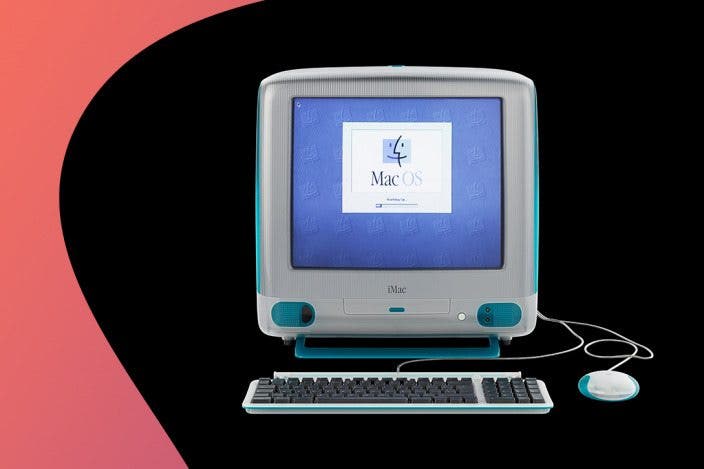
System 1 was the first ever Mac software and it came pre-installed on the Macintosh 128K. It was entirely black-and-white and it included a desktop, icons, folders, trash, windows, documents, applications, a menu bar, and the system software. At this point, you were only able to run one application at a time! Built-in apps included MacWrite, MacPaints, and Finder. It had features like a calculator, alarm clock, and notepad. There was also a simple number sliding game called Puzzle. Finally, there was a control panel where you could customize settings such as wallpaper, mouse, keyboard, time and date, and of course, sound and volume. It also allowed printing. System 1 was the first time we saw the "Happy Mac" icon, which appeared when starting up your Mac was successful.
Fun Fact
Artist and graphics designer Susan Kare designed most of the fonts and icons in System 1. Many of her original graphics are still used on devices today. Her most notable design is the Command Key Symbol ⌘. She also designed the cute Happy Mac icon.
System 2 - April 1985
Rather than new features, System 2 was all about making it easier to use your Mac. System 2 opened 20% faster than System 1 and in general everything worked a little faster. It introduced the ability to create folders for easier organization. This was also when taking screenshots became possible, with the exact same command we use today: Command-Shift-3.
System 3 - January 1986
System 3 added the feature that makes the trash look full when there are files inside, and made it possible to create folders within folders. It also fixed bugs, made everything work faster, and made it possible to use floppy disks with more storage, which at the time was 800 KB, an upgrade from the previous 360 KB), which was enough to store a 10- to 20-page document.
System 4 - January 1987
This was considered a smaller update but it did a lot of cool things like adding support for color displays! System 4 also made it possible to print in the background while using the computer for other tasks without the system crashing. It also introduced MultiFinder, which finally let users open and use several apps simultaneously.
System 5 - October 1987
System 5 made a lot of improvements to System 4, like making it even easier to multitask and use third-party hardware. It also introduced a display of current RAM usage and extended the Control Panel to give users more functionality.
System 6 - April 1988
One of the biggest upgrades was to MultiFinder, which now lets users switch more easily between multiple open apps while still seeing the desktop while using the apps. It also improved overall graphics and gave computer icons a more three-dimensional look. We also got QuickTime, which lets users play audio and video files.
System 7 - May 13, 1991
This upgrade improved the system’s ability to share files and data with other users and turned the trash into a folder rather than its own feature. System 7 also made it easier to navigate by creating shortcuts to folders and making it possible to drag and drop files to rearrange them. It also introduced Balloon help, which were pop-ups that included text that made it easier to understand what exactly users were selecting or clicking on. Finally, rather than using floppy disks, System 7 ran on a hard drive. For the next six years, System 7 was the latest software update and this was the longest a software was used without a major update in Apple's history.
Mac OS 8 - July 26, 1997
This was a big redesign visually, making everything look a little less flat. It also allowed users to set a picture as their desktop background and actually personalize their computer. Mac OS 8 also made huge leaps in navigation, such as spring-loaded folders. This refers to the ability to drag a file over a folder and wait for it to show the content inside it, such as other folders, without actually having to open the folder individually. It also introduced tabs to windows for even better multitasking. Mac OS 8 also introduced Sherlock, which let you search your files by name, similar to today’s Spotlight search. It also made it easier to browse the internet and email. Because of all the improvements and user-friendly options for new users, this was a widely popular OS that was bought by 1.2 million users within two weeks of its release.
Mac OS 9 - October 23, 1999
Apple referred to the 9th update to Mac’s operating system as "The Best Internet Operating System Ever," so expectations were high. The Sherlock search feature was extended to also browse the internet and online shopping. It also introduced the ability to log in with multiple users! This is also when Apple came out with a lot of security upgrades, like Keychain for secure password management, file encryption, and the ability to use your voice as a password.
Mac OS X 10.0 (Cheetah) - March 24, 2001
The first software with a code name is the one that swapped out Control Panels with System Preferences. It also introduced a lot of new applications and utilities including PDF support, Terminal, Dock, Mail, and Address Book. It introduced the "Aqua interface" which is what Apple called the blue, water-like theme with semi-transparent windows and buttons that looked a little like droplets. This software was a lot more similar to what users are used to today, and it was considered to be an expensive update at $129, which is closer to $240 today. Despite being called Cheetah, it was known to be quite slow because all of the new features required a lot of RAM.
Mac OS X 10.1 (Puma) - September 25, 2001
Compared to Cheetah and older software versions, Puma was faster and considered a lot more usable for the everyday person. While CD and DVD burning and the iTunes app were introduced before Puma was released, they became a lot easier to use with this software. Puma was also compatible with a lot more third-party apps and devices, even offering support for digital cameras.
Fun Fact
When introducing this new software, Steve Jobs said, "We made the buttons on the screen look so good you'll want to lick them."
Mac OS X 10.2 (Jaguar) - August 23, 2002
Jaguar did a lot of things differently. My least favorite update was the cute Happy Mac icon being replaced by the gray Apple logo that we still see today. In addition to the usual improvements that made Macs faster and more efficient and user-friendly, Jaguar introduced the Inkwell utility which could recognize hand-written text. It was also the beginning of iChat, a messaging app that would later become Messages and FaceTime. Users also saw better search abilities in Finder, a Junk Mail folder in the Mail app, improved internet searching, and automatic discovery of network devices. The QuickTime update introduced MPEG-4 support, which is still a widely used video video format.
Mac OS X 10.3 (Panther) - October 24, 2003
Panther is a hard software to summarize as it had more than 150 new features! iChat was now able to do audio and video conferencing and the new Safari app became the default browser, replacing Internet Explorer. It also gave users the ability to see all open windows as thumbnails, making it easier to multitask. Panther introduced FontBook, a brand new system that allowed users to install new fonts while also managing and organizing existing ones. Finally, Finder got a sidebar and could now support color labels, zip files, and live search capabilities.
Mac OS X 10.4 (Tiger) - April 29, 2005
The Tiger update apparently had over 200 new features. These included the introduction of the Spotlight search we know today and a dashboard with widgets showing the weather, calculator, and a stock ticker. Users now also got a built-in thesaurus (and dictionary) and a very early version of PhotoBooth. iChat got better too, now supporting audio conferences with up to 10 people and video conferences with up to four people.
Mac OS X 10.5 (Leopard) - October 26, 2007
With over 300 new features, Leopard gave Mac users a lot more functionality and options. It introduced Time Machine, which allowed for automatic backups of all your data and Boot Camp, which made it possible to run Windows XP or Windows Vista on your Mac. Leopard also introduced Spaces, which is a way to manage different desktops for different projects, making it easier to separate work and play. Even today there are people in vintage Mac communities that still use Leopard (or Tiger) and discuss pros and cons plus share tips on Reddit.
Mac OS X 10.6 (Snow Leopard) - August 28, 2009
Snow Leopard didn’t have a lot of visual or user interface changes. Instead, it focused on making everything run more efficiently and smoothly. It also freed up as much as 6 GB of hard drive compared to the Leopard software update. It offered support for notebook trackpads and introduced multi-touch trackpad gestures like pinching to zoom. Snow Leopard gave users an Apple store to buy and download apps. It also redesigned QuickTime, allowing users to trim videos and screen-record. This software update also made it possible to click and hold an app icon, such as your internet browser, to see all the windows that you have open in a given app.
Mac OS X 10.7 (Lion) - July 20, 2011
Lion introduced over 250 new features to Mac users! Even though this was less, numerically, than the Leopard update in 2007, there were a lot of really significant changes. This is when we got the FaceTime app, AirDrop, and the much-loved autosave in apps such as TextEdit, Pages, and Keynote. Lion also came with Mission Control, which combined various existing features for an easier and more streamlined way to manage both windows and apps. It also introduced Launchpad, which is like an iPhone home scream page showing apps and their respective notification badges. Lion also made it possible to automatically reopen whatever apps you were using when you restarted your Mac.
OS X 10.8 (Mountain Lion) - July 25, 2012
Mountain Lion is the last software version that was named after big cats and it came with over 100 new features. It gave us Messages rather than iChat, a Notification Center, a Game Center, AirPlay Mirroring, dedicated Notes and Reminders apps, and Share Sheets. Mountain Lion also introduced system wide dictation or voice-to-text, which was a great accessibility and productivity feature. This software update made the Mac work a little more like an iOS phone and made it even easier for Apple products to work together as part of the Apple ecosystem.
OS X 10.9 (Mavericks) - October 22, 2013
The Mavericks software update had many new firsts. It was the first free Mac update and the first one to be named after a Californian landmark. Mavericks introduced Maps, iBooks, and iCloud Keychain. It also had interactive notifications, let unused open apps 'nap' to save battery, and gave Finder tabs and tags for easier file organization. It was also notably better in terms of speed and battery life.
OS X 10.10 (Yosemite) - October 16, 2014
Yosemite introduced Continuity, which allowed users to work on tasks between devices, like starting a call on your phone and handing it off to your Mac. It also gave us the Photos app, the equivalent of an iPhone’s Today View, and the ability to mark up PDFs or images directly in the Mail app. Plus, it also became possible to send larger files as iCloud link attachments. Finally, the iCloud Drive now allows users to store essentially any type of file in the cloud.
OS X 10.11 (El Capitan) - September 30, 2015
El Capitan didn’t have too many new features, but offered improvements to a lot of what already existed. The Notes app now had URL previews and supported images and checklists. Spotlight could now be searched using more natural language. Safari got pinned tabs and the ability to silence specific tabs. El Capitan also brought Split View to Mac.
macOS 10.12 (Sierra) - September 20, 2016
Sierra rebranded the name of software updates to match that of other devices, so Mac OS X became macOS to match iPhone’s iOS. Sierra introduced Siri for Mac, Universal Clipboard, folders that sync via iCloud, and picture-in-picture windows. With Sierra, users could use Apple Pay to shop on Safari and confirm purchases with their phone’s Touch ID. The Photos app got the Memories feature, Messages got tapback reactions, and optimized storage now automatically saved space by offloading files that you rarely used. We also got tabs in apps, Night Shift, and auto-lock.
macOS 10.13 (High Sierra) - September 25, 2017
High Sierra is another update that wasn’t huge on brand new features but came with lots of improvements. The Photos app got better editing tools and the People album while Safari got auto-play blocking online videos. High Sierra also introduced VR capabilities, improved the search feature in the Mail app, and gave the Notes app the ability to make tables and pin notes.
macOS 10.14 (Mojave) - September 24, 2018
Mojave was heavy on new apps, introducing Home, Voice Memos, Apple News, and Stocks. Other upgrades included the ability to FaceTime with up to 32 people simultaneously, a more comprehensive dark theme for the built-in apps and the user interface. Mojave also introduced desktop stacks for organization and dynamic desktop wallpapers that change based on the time of day. It added the option of Gallery View in Finder and Continuity Camera that let users scan documents using their iPhone or iPad directly onto the Mac. Mojave was the last Mac software that supported 32-bit applications.
macOS 10.15 (Catalina) - October 7, 2019
Catalina shook things up in the Mac world. It turned iTunes into the Music app, introduced Sidecar, which turned an iPad into a secondary display, and Find My Friends and Find My iPhone merged into the Find My app. Lots of core apps got redesigned, including the popular Reminders and Notes apps. We also got Screen Time to help users track how much time they spent on their devices. Catalina also added the Voice Control accessibility feature, letting users control the entire computer using just their voice.
macOS 11 (Big Sur) - November 19, 2020
Big Sur was a big overhaul that made the Mac look even more like an iPhone or iPad, especially when it came to app icons. We also got a Menu bar that is more translucent, a customizable Safari start page, and optimization for Apple’s new M1 chip. Big Sur also gave us a Notification Center with interactive widgets and a new Control Center full of Mac settings for quicker access. The Maps app now had look-around features, curated guides, and even indoor maps. The Messages app got Memoji, inline replies to avoid confusion, and the ability to pin conversations to the top of your chat thread list. Oh, and there were several security updates and a new Privacy Report so that Safari could identify website trackers.
macOS 12 (Monterey) - October 25, 2021
Monterey introduced some of the features that are still among my favorite reasons to own a Mac. It improved the Apple ecosystem with the Universal Control feature that let the mouse or keyboard on one device work seamlessly on another one. It also let iPhones and iPads AirPlay straight to the Mac to take advantage of the bigger display. Monterey also brought the Shortcuts app to Mac, a Shared with You section within various apps, and Tab Groups for Safari and synced tabs across devices. Monterey also introduced Live Text, Focus Mode filters, Private Relay, Quick Notes, and Visual Lookup. We also got SharePlay for watching things with friends and Spatial Audio for FaceTime.
macOS 13 (Ventura) - October 25, 2022
Ventura gave Mac users even more continuity features and a lot of core app updates. Continuity Camera now lets users use their iPhone as a webcam and video calls now have Desk View, Studio Light, and Center Stage. Multitasking got easier than ever with Stage Manager, and there was a new Freeform app that could help users brainstorm between devices and could be shared to collaborate with others. Ventura also turned System Preferences into System Settings and made it look more like the iPhone’s Settings app. Passkeys now allowed users to use touch ID to sign into various apps and websites without needing to type in a password. The Messages and Mail app let users schedule messages, unsend messages (within a specific time frame), and text messages could now be marked as unread. Ventura also gave users the iCloud Shared Photo Library, an improved Spotlight Search, redesigned Clock and Weather apps, and Live Captions for audio content.
macOS 14 (Sonoma) - September 26, 2023
Sonoma introduced Game Mode for better graphics performance, widgets that could be directly on the desktop, new dynamic screen savers, and autofill was now better than ever. FaceTime gained the Presenter Overlay feature, and Safari got separate profiles, allowing users to switch between clusters of tasks. A new Accessibility feature allowed users who were unable to speak to use Live Speech, which spoke what they typed out loud.
macOS 15 (Sequoia) - September 16, 2024
Sequoia was the first software update that incorporated Apple Intelligence, Apple’s very own artificial intelligence. Apple Intelligence brought smart writing tools, image-generating apps, and what was promised to be a better Siri. We also got a new Passwords app, a window tiling feature, new text effects in the Messages app, and smart math and equation solving in the Notes app. Sequoia also improved the Maps app by providing topographic maps and allowing users to create custom routes for walking or hiking. We also got a redesigned Calculator app and iPhone Mirroring, which is the ability to access and use your iPhone from your Mac.
macOS 26 (Tahoe) - September 15, 2025
This software skipped from macOS 15 to macOS 26 in a rebrand across all Apple devices. It began the convention of naming all operating systems across the Apple ecosystem after their year. Like many car models, they are not named after the year they are released but rather the year when it will be most widely used by the public. The latest macOS update improved Apple Intelligence capabilities and new features like Call Screening and Hold Assist in the Phone app. Tahoe also introduced a customizable Control Center with multiple pages and third-party support and gave everything a new look using a design called Liquid Glass. Tahoe also made all devices more alike, with all of them adopting the Liquid Glass look, and the 26 in their OS name.
We expect the next macOS to come out in the fall of 2026. We’ll be updating this list with every new release. Now that you are familiar with every Mac operating system, check out our article on every iPhone model that Apple ever made.
I hope our Mac OS versions list helped you better understand how Apple’s computers and laptops evolved through the years.
FAQ
- What operating system do I have? Click on the Apple in the top left corner of your Mac’s display, select About a Mac, and look at what it says next to macOS.
- How to do a MacBook serial number lookup? Click on the Apple in the top left corner of your Mac’s display, select About this Mac, and look at what it says next to Serial number.
- What was the last macOS version to have an intro video when installed? Mac OS X 10.6 Snow Leopard released in 2009 was the last Mac operating system to have an introductory video to help you navigate when you first install it.
- How do I update OS on Mac? Click on the Apple in the top left corner of your Mac’s display, select System Preferences, select Software Update, and if there's an update, click on Update Now.
Top image credit: matyss / Shutterstock.com

Olena Kagui
Olena Kagui is a Feature Writer at iPhone Life. In the last 10 years, she has been published in dozens of publications internationally and won an excellence award. Since joining iPhone Life in 2020, she has written how-to articles as well as complex guides about Apple products, software, and apps. Olena grew up using Macs and exploring all the latest tech. Her Maui home is the epitome of an Apple ecosystem, full of compatible smart gear to boot. Olena’s favorite device is the Apple Watch Ultra because it can survive all her adventures and travels, and even her furbabies.
 Rachel Needell
 Olena Kagui
 Rhett Intriago



 Cullen Thomas
 Amy Spitzfaden Both
 Leanne Hays